
Mar 14, 2017 5:23 PM UTC
Delivered

Surface offset, thicken and shell

Related products:Creo Parametric

When offsetting or thickening surfaces by a value greater than the minimum radius of the surface, the feature just fails. It should display a warning and absorb the intersecting surface creating a sharp edge where the radius drops below zero. The automatic offset is a poor solution. For example, the simple revolve of a spline shown below and attached (Creo 2) fails if the thickness is increased so the radius drops below zero.


A thicken or offset feature that constantly fails when the parent surface is modified is extremely frustrating and significantly diminishes the value of many of the surfacing enhancements and features such as freestyle.
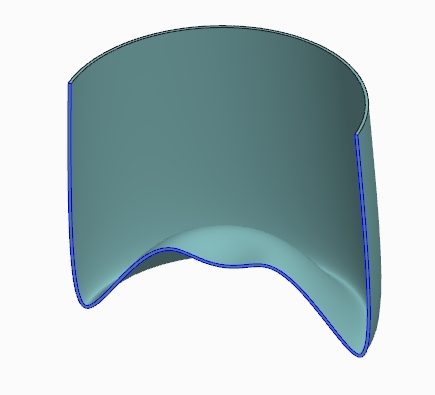

170310151134_1.jpg


Catia has been able to do this for years and even Autodesk Inventor can do it.


It might be a good idea to have equal wall thicknesses for many manufacturing processes, but surely that is up to the user? - They might add a round at the sharp edge to give a reasonably constant wall thickness, or perhaps add a boss feature or cutout where the problem is. With 3D printing capabilities meaning the thickness is less critical, this becomes even more of a software shortcoming.

10 replies

Mar 14, 2017 5:40 PM UTC

Moving to Creo.

Mar 14, 2017 6:47 PM UTC

PS Sam Worthington‌ et all,

The PTC Community Help Group is for questions about Jive features and reporting issues with PTC Community.

To give your product related question, issue, or idea the most exposure, please post it within that product's community.

Please keep the input coming.

Best,

Toby

Apr 7, 2017 12:21 PM UTC

Hello

It's certainly a good idea, for sure

Until PTC comes up with a solution, which can take a long time, there are some alternative solutions in Creo

You can use a surface offset with the option "Automatic fit"

07-04-2017 14-11-50.gif

Mar 27, 2018 4:54 PM UTC

Does anyone know if Creo 5 can offset with intersecting surfaces?

Jun 14, 2018 7:18 PM UTC
Status changed to: Acknowledged
Feb 18, 2021 10:01 AM UTC

As shown below, Onshape can do it and PTC did of course buy the company back in 2019, but I'm now running Creo 7, and PTC still haven't manged to sort this out for what is supposed to be market-leading software.


SamWorthington_0-1613642184325.png


Jun 2, 2021 10:08 PM UTC

@esallingboe-2 Thanks for your input and sorry I didn't acknoledge it earlier.


I've never found the Automatic Fit option to be any practical use. Are there situations where you find it helps?


Sam

Feb 21, 2022 8:39 AM UTC
Status changed to: Implementation In Progress

this is currently in  research.

May 21, 2025 4:58 PM UTC
Status changed to: Delivered

Note that this is available with the new "Rolling Ball" option for Surface Offset since Creo 10.1 with continued enhancements in Creo 11 and Creo 12.

It is not yet available in Thicken.

Jan 22, 2026 5:18 PM UTC

Thank you, yes. It has been a long time coming but is a very welcome addition.