
Feb 28, 2014 1:04 PM UTC
Archived

Surface colors in 3D-PDF

Related products:Creo Parametric

I´m running Creo 2.0 M090 and it´s not possible to generate 3D-PDF with colored surfaces.

We use 3D-PDF to discuss the products with our customers. They all have different OS and don´t want to install software to view the files. 3D-PDF fits fine to this requirement. The only bad thing is that the surface colors are not viewable in the 3D-PDF.

We don’t need the surface colors to make funny rainbow colored stuff, it´s all about technical criteria. For example see the picture below:
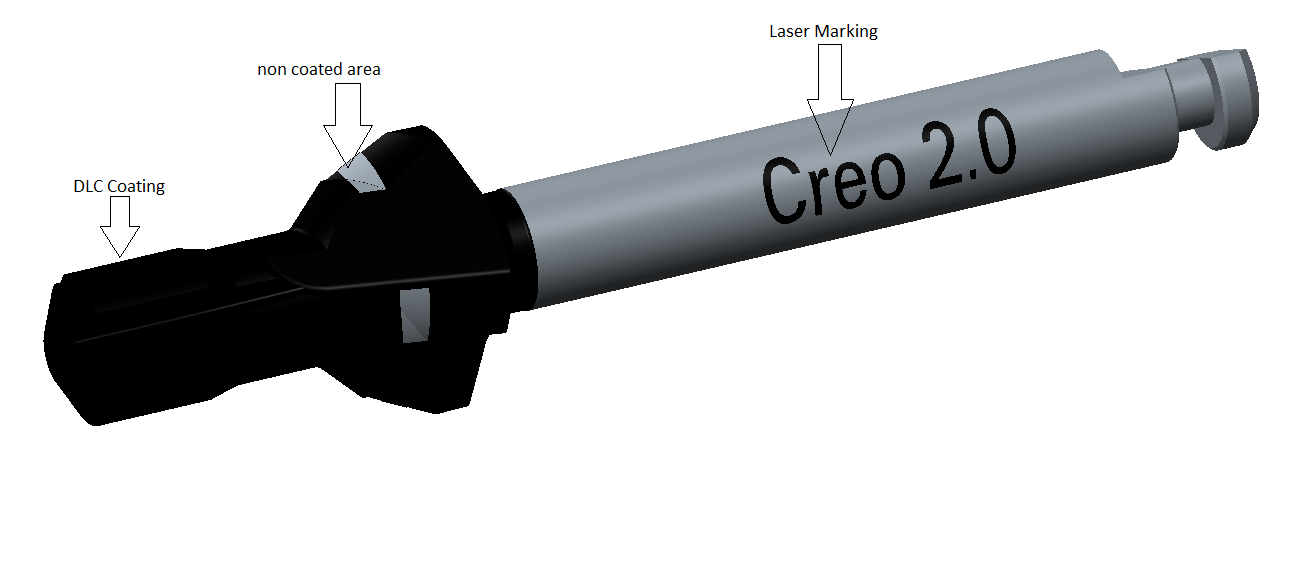
Unbenannt.png

The opportunity to use colored surfaces in 3D-PDF direct from a future Creo release would bring us a great benefit in communication with our customers!

Regards,

Dirk

By the way: We changed to Creo 2.0 from Creo/elements direct and there we got this opportunity.

4 replies

DirkSAuthor
Feb 28, 2014 1:23 PM UTC

Hello Steven,

are you sure your part has colored surfaces and it´s not the model color?

Feb 28, 2014 7:46 PM UTC

True, the initial image is a simple screen capture but the 3D takes on any number of odd color choices.  If you color surfaces and have a different body color, the 3D_PDF model can take on either the colored surface -or- the body color you assigned.

PTC's 3D PDF is seriously under-utilized.  In the VRML standards, coloring of surfaces and applying image textures have been a staple of the standard since day 1 (maybe day2).  This standard is decades old.  For this to -not- work in 3D PDF is a real let down.

Jun 14, 2018 8:23 PM UTC
Status changed to: Acknowledged
olivierlp
Community Manager
Jan 4, 2022 2:05 PM UTC
Status changed to: Archived

Hello,

We are archiving your idea as part of a general review. This action is based on the age of your idea and the total number of votes received, as per this announcement.

You can always post a new idea with all the details required in the form.

Thank you for your participation.

Olivier