
Summarize Creo Regen Warning or Error Messages
1. Describe the Problem
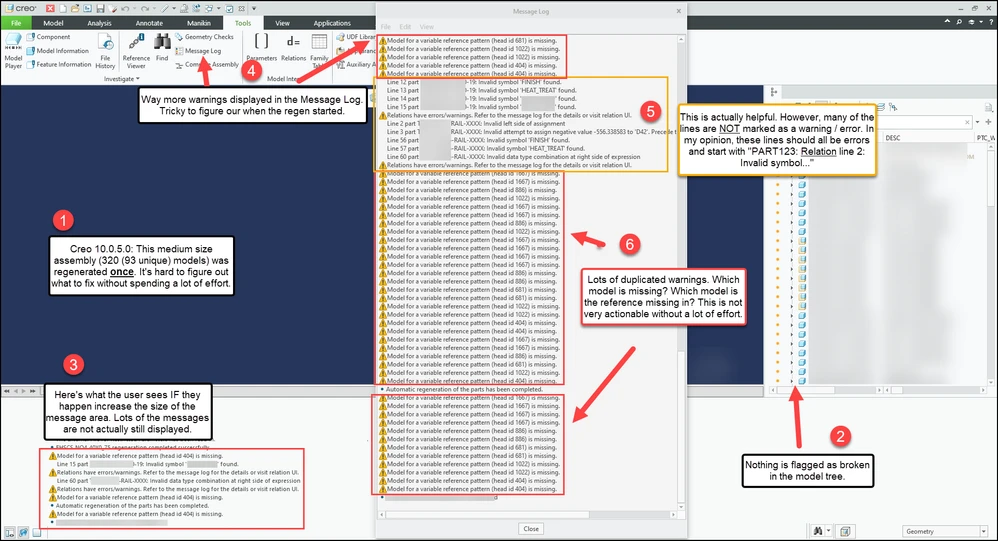
There's no quick way to summarize the Creo warning or error messages that occur during a regen. This problem gets multiplied when regenerating large assemblies which may generate 1000s of message lines during regeneration.
Current Problems:
- Regen warnings and errors stream by the message area quickly and are very easy to miss or ignore.
- Finding Message Log button or opening the Trail file in a text editor (ex: Notepad, Notepad++) to see all previous messages is not something that most new users know about.
- It's difficult to find where the last regen started on large assemblies in the Message Log or Trail file.
- There often are a TON duplicate warning or error messages.
- Many warning or error messages are hard to understand and often don't include the name(s) of the related model(s).
- Some messages that should be warnings or errors are not identified as such.
Here's an example of the problems:
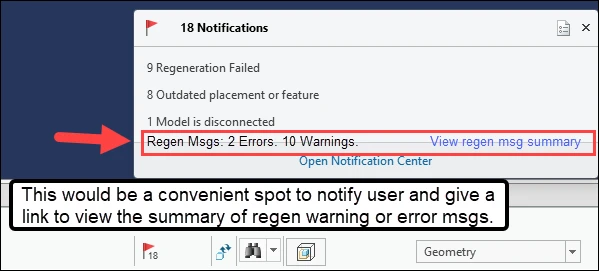
Possible Solution:
2. Are you using a workaround?
Most users just ignore (or don't see) the regen warning or error messages. Those that attempt to review or resolve the regen warning or error messages with the Message Log or Trail file waste a lot of time.
3. What is the use case for your organization?
Quickly summarize warning or error message that occur during a regen that encourages users to resolve review or resolve. Creo the warning and error messages should be intuitive (ex: contain the related model name(s) when possible).
4. What impact does this problem currently have on your organization?
Assemblies can contain lots of models with warning or error messages. Wasted time trying to understand and summarize the warning or error messages.