
Sort parameters by name in Model Tree Columns dialog
1. Describe the Problem
Parameters in the Model Tree Columns dialogue are not sorted alphabetically:
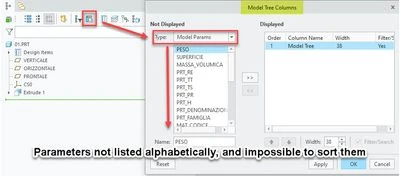
We sometimes have models with more than 100 parameters.
We already make use of multiple mapkeys to load model tree configurations, but sometimes those are not suited to a certain task, and you want to quickly change the parameters displayed in the model tree.
Currently, it feels like you have to start a project to achieve what should be a non-effort.
2. Are you using a workaround?
If you know the exact name of the parameter, you can enter it in the Name field. If you don't know the exact parameter name/spelling, there is no workaround.
3. What is the use case for your organization?
Fast(er) information overview. Performance is bad with many parameters displayed in the model tree, so fast reconfiguration of displayed columns would be helpful.
4. What impact does this problem currently have on your organization?
It feels like I am deliberately slowed down in my work. It throws me out of flow/the zone and is extremely annoying.