
Smarter handling of filenames
Please fix my gripes with how Creo presents and processes filenames.
First, note how the system is inconsistent about the letter case of filenames:
You specify McMaster_94729A325.prt in the Save-As dialog box, and the system writes it to disk as mcmaster_94729a325.prt and it shows it in Windchill as MCMASTER_94729A325.PRT
In addition, in the status line and in the message log, they will show up sometimes lowercase and sometimes uppercase.
Gripe #1: When specifying a filename using wildcards, the file-open dialog only finds names in lower case letters:
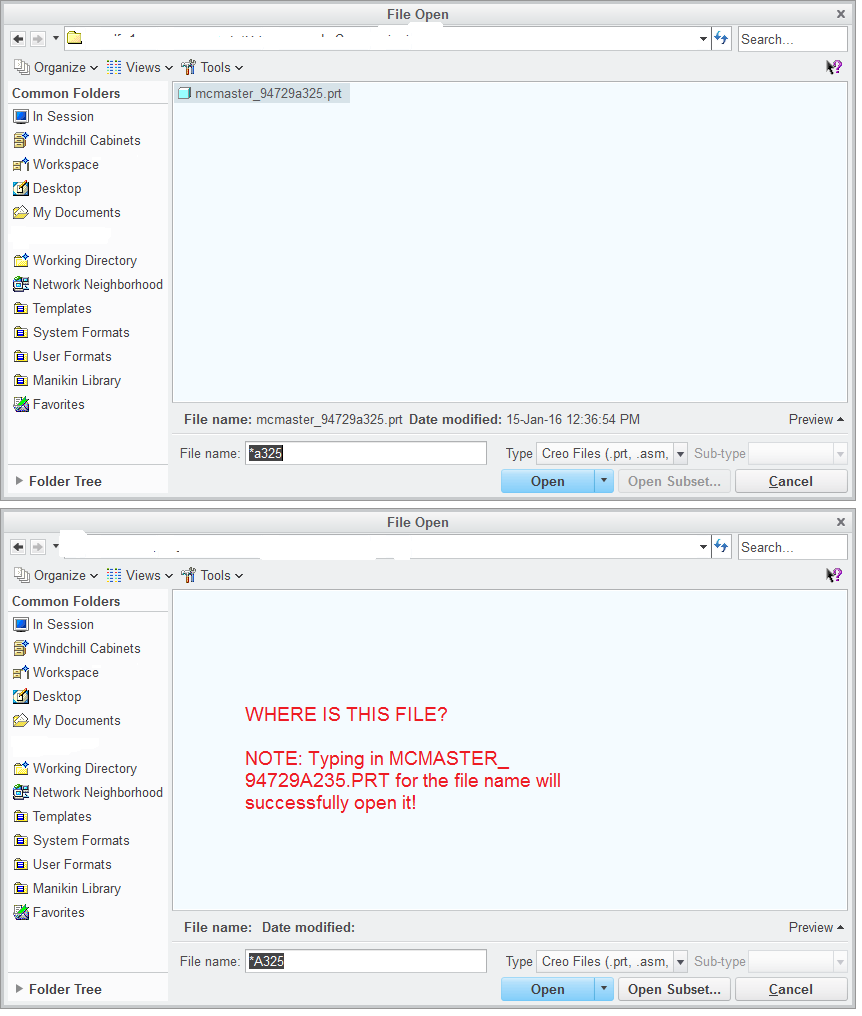
I submit that in both cases, the file should be displayed.
This idea has been mentioned before: File Open Pro Engineer > Case Sensitive
Gripe #2:
Selecting the filename text from the message log could be a better time saver. If you double-click on a filename shown in the status line, Creo will select the word and you are able to copy this text to the clipboard. You can then paste it into the file-open dialog box. I often use this method when assembling a component into an assembly in another window. But there are two minor inconveniences to this method:
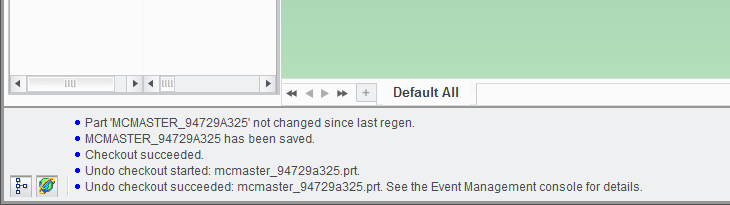
Refer to line 1 in the pictured status-line above: double-clicking on MCMASTER will select "MCMASTER_94729A235". That is good, because you can the copy and paste this text to the file-open dialog box.
Refer to line 2 in the pictured status-line above: problem is that when double-clicking on word MCMASTER, the blue dot character will also be selected; so you have to delete few characters at the beginning of the pasted string.
Refer to line 4: A subtle problem is that the "." at the end of the sentence will also be selected. So you have to delete the "." in the text "mcmaster_94729a235.prt." or the part won't be selected for assembly.
How about the filenames are always presented as in case 1 above? (delimited by single quotes).
I realize that my gripes are minor, but they seem to be simple things to fix and doing so would improve the work-flow.