
Nov 11, 2014 12:58 PM UTC
Acknowledged

Smart Explode line - Assembly mode

Related products:Creo Parametric

It would be great to have a smarter line generator when creating Explode State.

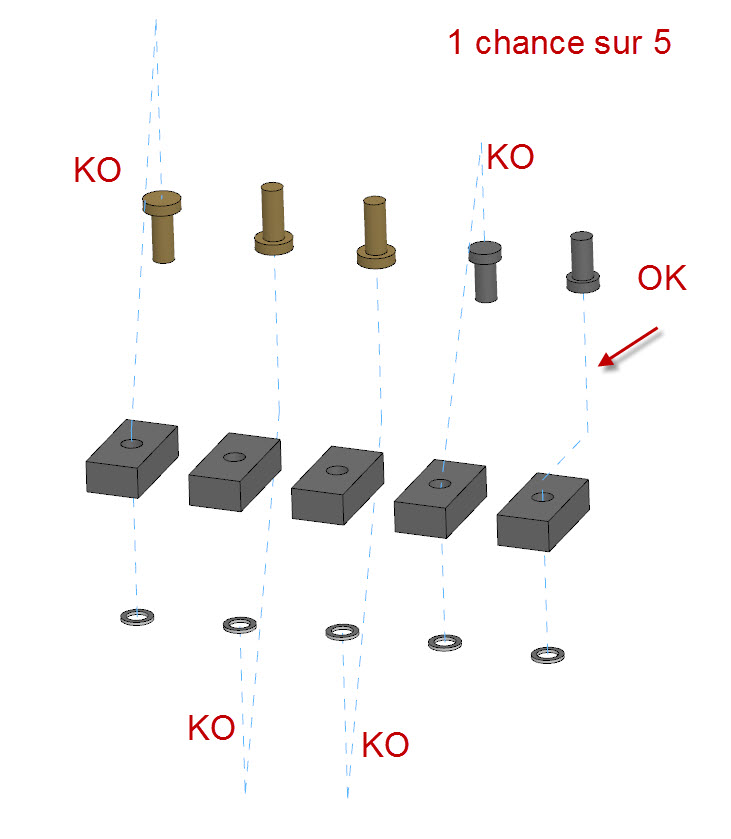
In this simple exemple, we can see that it's hard to have a correct result at the first time .

Not easy and really powerfull.
1.jpg

8 replies

Nov 11, 2014 8:08 PM UTC

Add to that the option to move complete segment rather than just the corner nodes. 

Problem is that you want to maintain that nice 30 degree offset line but you have to eyeball it.

Mar 23, 2016 8:51 PM UTC

At least allow us to flip the connection of the offset line.  The dialog box has the button but is always grayed out.  That is the biggest headache I have with offset lines.  The only way I have found to get it right the first time is to select the end of an axis (not easy with all axis showing in a large assembly).

I can usually get the 30 degree offset line to snap into place if I move the correct end first.

Jun 14, 2018 6:50 PM UTC
Status changed to: Acknowledged
Feb 9, 2022 10:36 AM UTC

For reference to other. The direction of the explode line is depending on which side of the axis you click.

So on the example above, when you click on the bottom end of the axis of the first bolt, the explode line goes down. When you click on the upper side of the axis of the left washer, the explode line goes upwards.

Feb 9, 2022 1:21 PM UTC

The explode line is easier to create correctly when an axis is used.  However. when using a cylindrical surface, as was done in the example, we don't appear to have any control over the direction the line takes.  Orientation of the model, and where all of the clicks are placed may have some impact on the direction of the explode line but I have not been able to come up with a definitive process to get the desired outcome.

Feb 9, 2022 2:31 PM UTC

I did not say the issue was solved, I was informing about a workaround 🙂

Jul 11, 2023 1:37 PM UTC

The functionality for a directional arrow is already there and works for attaching to a curve or edge.  Please expand that capability to cylinders and surfaces.

kdirth_0-1689082547264.png

kdirth_1-1689082636420.png


Jul 11, 2023 2:56 PM UTC

Expand indeed to cylinders and surfaces AND axis.