May 2, 2012 2:27 PM UTC
Current Functionality

showing a drawing dimension in a specific view

Related products:Creo Parametric

We want  to show in a drawing a dimension of a specific feature selected from Model Tree in a specific view (it was possible in Wildfire4)
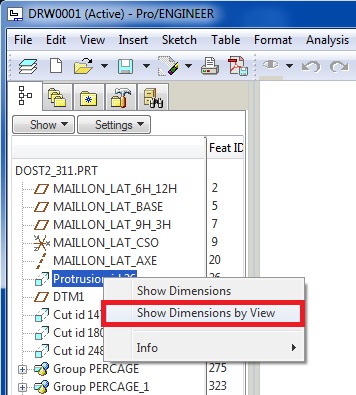

by_view.jpg

8 replies

May 4, 2012 3:10 PM UTC

This seems to be an existing function.

Just change the name of the 'Show Model Annotation', and is further strengthened

FPerezAuthor
May 7, 2012 5:52 AM UTC

Hello,

With the new UI, You can't display the annotation for a spécific feature in a spécific view.

May 7, 2012 6:18 AM UTC

select feature --> right mouse button --> 'Show Model Annotation'  -> pick a 'view'

In the pick of view, it is recommended to use the filter 'Drawing View' ,

If you choose to feature, will not you need results

FPerezAuthor
May 7, 2012 6:32 AM UTC

Hello,

if you do :

select feature --> right mouse button --> 'Show Model Annotation'  -> pick a 'view'

You will obtain all the annotations that can be display in this view.
And not just the annotation of the feature selected.

Do you agree ?

Thanks for your answer. Fabrice.

May 7, 2012 6:51 AM UTC

Sorry, I understand

Jan 17, 2014 8:07 PM UTC

The "Show Dimensions by View" command has been brought back as of Creo Elements/Pro 5.0 M200 and Creo Parametric 2.0 M060.

Jun 14, 2018 6:55 PM UTC
Status changed to: Acknowledged
Feb 15, 2021 3:45 PM UTC
Status changed to: Current Functionality

The "Show dimensions by view" are a current functionality of Creo . Updating the status of this product idea