
Oct 17, 2022 8:45 AM UTC
Acknowledged

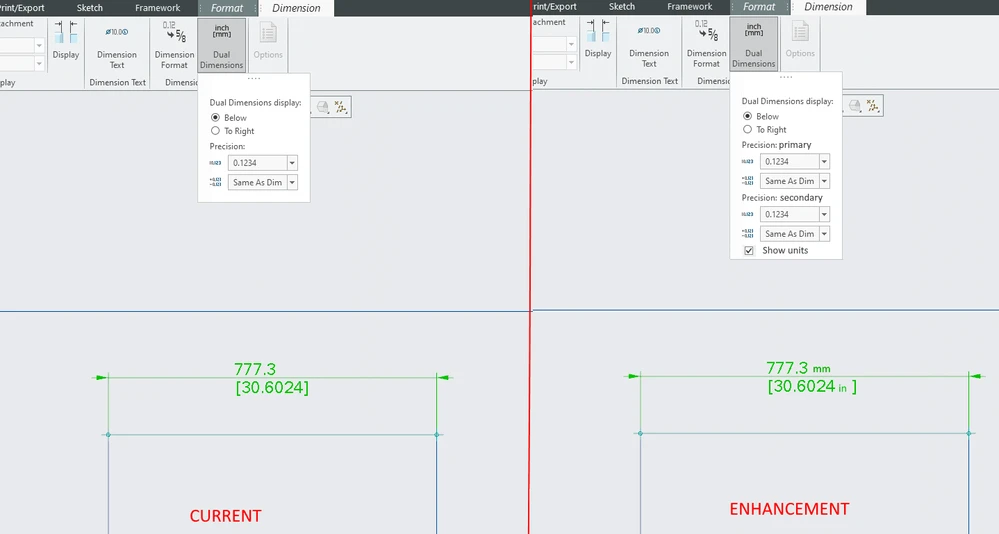
Show units in dual dimensions

Related products:Creo Parametric

1. Describe your environment: What is your industry? What is your role in your organization? Describe your stakeholders.
 General engineering. Senior design engineer.


2. What version of Creo Parametric are you currently running?
9.0.2.0

3. Describe the problem you are trying to solve. Please include detailed documentation such as screenshots, images or video.
Currently there is no way to show units in dual dimensions. Suffix can partially solve this problem but only on main dimension. Workaround is adding attaching note to dimension with units or just provide general note in drawing. Also different precision for primary and secondary units in options.
 

3.png

4. What is the use case for your organization?
    Making drawings with dual dimensioning.

5. What business value would your suggestion represent for your organization?
    Shortens work time.

8 replies

olivierlp
Community Manager
Oct 17, 2022 1:18 PM UTC
Status changed to: Acknowledged

Thank you @DavorGranic for your idea. Based on the information you provided, we are acknowledging it as the Community management team. This is not a commitment from the Product team. Other users may comment and vote your idea up.

Olivier
Oct 17, 2022 1:37 PM UTC

What dimensioning standard are you using?

The abbreviation for Inches is IN, not in.

Oct 19, 2022 12:56 PM UTC

 @BenLoosli  I used "in" as example, like its given in Solidworks and Inventor. I wouldnt mind " even.  

Oct 19, 2022 1:31 PM UTC

I figured as much ☺

But the fact that SolidWorks and AutoCAD do not use standards does somewhat bother me. ASME Y14.38 "Abbreviations and Acronyms for USe in Product Definitions and Related Documents" has a very extensive list of 'approved' abbreviations. There is also this section in ASME Y14.2-2014 (6.3) that states "Uppercase letters shall be used for all lettering on drawings unless lower case letters are required".

With PTC and another CAD system I used to use, we were constantly asking them to utilize the standards when they implemented functions.

Oct 19, 2022 1:57 PM UTC

Might as well let use of standard ones and option to enter manually what he wants displayed.

May 8, 2024 4:04 PM UTC

ASME Y14.5 has a requirement that the secondary dimension has a unit abbreviation after it. See ASME Y14.5-1994 1.5.3.1 or AMSE Y14.5-2018 4.2.4. It would be good to have this feature so that our drawings actually meet the standard.


May 8, 2024 5:02 PM UTC

"ASME Y14.5 has a requirement that the secondary dimension has a unit abbreviation after it. See ASME Y14.5-1994 1.5.3.1 or AMSE Y14.5-2018 4.2.4. It would be good to have this feature so that our drawings actually meet the standard."

I do not think that is what ASME Y14,5 is referring to. It is referring to drawings that use mixed PRIMARY dimension units. An example would be a tire (225R18) which has the rim diameter in Inches (XXX-18) and the tread wall height  (225-XX) in Millimeters.

If your drawings use dual dimensioning, then you should have a note stating what the secondary dimension units are, along with a note specifying the primary units.


May 9, 2024 5:19 PM UTC

Good point. Thanks.