
Selecting layers in an assembly should highlight all the features that are within the layer
1. Describe your environment: What is your industry? What is your role in your organization? Describe your stakeholders.
Industry - High End Electronics
Role - CAD Admin
Stakeholders - Engineering, downstream teams, vendors, etc.
2. What version of Creo Parametric are you currently running?
8.0.4.0
3. Describe the problem you are trying to solve. Please include detailed documentation such as screenshots, images or video.
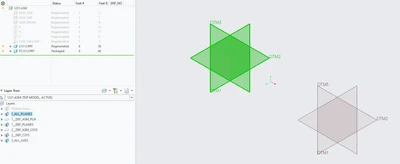
When selecting a layer it currently only highlights the features in the first assembled instance in the assembly. As seen in the screenshot below when selecting the planes layer only the top version of the same parts features are highlighted. When the layer is hidden all of the planes are still hidden.
4. What is the use case for your organization?
When trying to inspect parts selecting the layer to make sure everything is included per company practices and if not all the features are highlighted it can be confusing to see only half of the features selected when they all still are within the layer.
5. What business value would your suggestion represent for your organization?
It would eliminate confusion when checking what is in a layer within a large assembly with multiple of the same components in many different locations.