
May 1, 2012 9:28 AM UTC
Acknowledged

See your model at the right 1:1 scale on your screen - Define a 1:1 zoom of 3D models

Related products:Creo Parametric

Be able to define a 1:1 screen Zoom of 3D models   to physically measure the model on the screen.

It is possible to print a 3D model in 1:1 scale but when often need to show our 3D models (watches) on the screen in real 1:1 dimension.

It is very important for us to see them at the right 1:1 scale.

In Rhino, it is possible to calibrate the 1:1 Zoom by measuring a stallion.
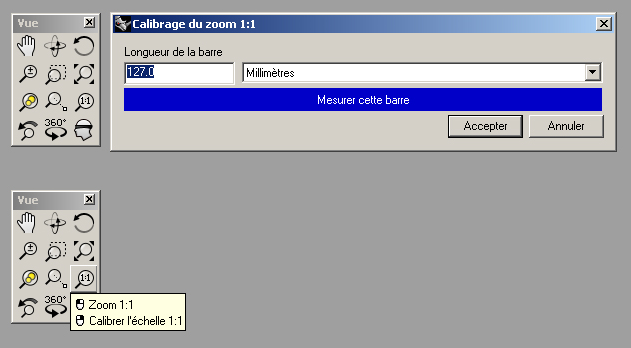
1_1_scale_zoom.png

5 replies

Jul 12, 2012 6:49 AM UTC

This is really a good idea.

The calibration could be automatically done by Pro/E using the pixel density of the display (in DPI).

Dec 28, 2012 7:27 PM UTC

We would like to see that very simple function enabled too.

Jun 14, 2018 7:32 PM UTC
Status changed to: Acknowledged
Apr 25, 2019 2:20 PM UTC

Hi Nicolas,


This is a bit of a different approach, but have you tried out the Augmented Reality functionality in Creo (starting in Creo 4.0 M060)? You can quickly publish a model for viewing on your mobile device in augmented reality. Using the Spatial Target, it gets projected onto your desk or floor or table at 1:1 scale. Even more, you can walk around it as though it were actually there. I would be interested to get your thoughts on this.


Here's an overview video for more info: https://www.ptc.com/en/products/cad/creo/augmented-reality


Luke

Nov 27, 2019 8:57 AM UTC

CATIA has a diferent approach. in bottom right of the screen, there is a number. Is the scale factor of our model, represented in our screen, to reality. Always we have a number that shows us the real size of the model.