
Aug 27, 2018 9:36 AM UTC
Archived

Save As with its common name

Related products:Creo Parametric

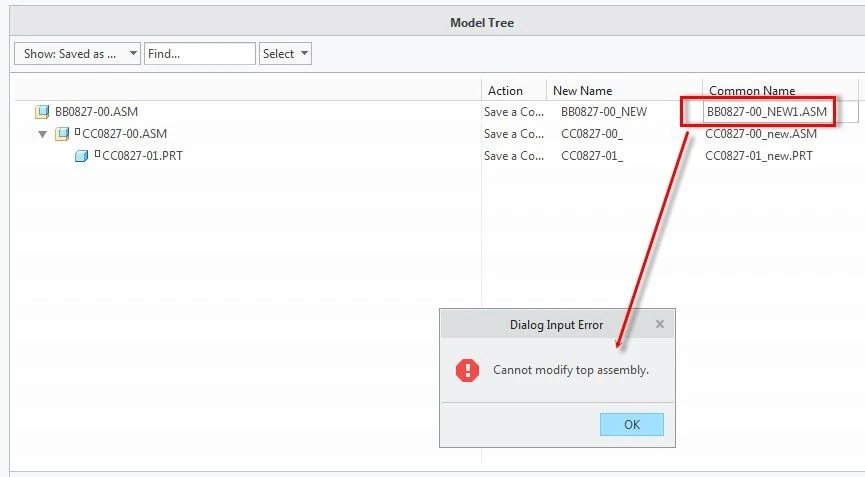
Currently you “Save As” a part or an assembly in the Creo, you are not allowed to enter its “Common Name”. You will have to call out the part and rename again. you are allowed to rename rest of parts except the top-level assembly that seems not to make good sense through.

Otherwise, you will have to do the rename action in Windchill. Most of companies do have File Name (Number) and Common Name (Description). The benefit of doing the rename in Creo is that we clear understand exactly what the parts are by review the dynamic model window if it is a big/complete assembly. save as.jpg
5 replies

Community Manager
Feb 12, 2025 11:22 AM UTC
Status changed to: Clarification Needed

Thank you @Joey_Chen for publishing your idea. However, we need more information as specified in the questions below. You may simply add a comment to your idea. The more details and context you give to document your idea, the better. Think about ways to educate and convince other Community members to support your idea and present your case to the product management team for consideration.


Please let us know within the next three weeks.

1. What version of the software are you running?.
2. What is the problem?
3. Are you using a workaround? If yes, please describe it.
4. What is the use case for your organization? Describe how your idea would work in context or how it would apply to a practical situation.
5. What impact does this problem currently have on your organization? (Number of users affected, hours of lost productivity, etc.)

Additionally, I invite you to check out this topic where PTC executives explain product managers' approach to customer ideas and input for product roadmaps.

Please see examples of well-documented ideas:

https://community.ptc.com/t5/Creo-Parametric-Ideas/Make-Shrinkwrap-quality-more-scalable-to-data-size-complexity/idi-p/810192 

https://community.ptc.com/t5/Creo-Parametric-Ideas/Option-to-Import-STEP-file-as-Inseparable-Assembly-by-Default/idi-p/812924 

https://community.ptc.com/t5/Creo-Parametric-Ideas/Eztol-Rename-action-not-synchronous-in-Eztol/idi-p/828000 

https://community.ptc.com/t5/Creo-Parametric-Ideas/Always-enable-ability-to-Add-View-Label-in-a-drawing/idi-p/837630 

Feature parameters can be input and changed togeth... - PTC Community 

Feb 25, 2025 1:59 PM UTC

this would reduce the number of activities to about 50% compared to the status quo in order to achieve the same goal in Windchill..

The way towards this goal would in essence remedy the missing ability in Creo parametric to enter a value in the field as shown in the image in the first post ('Dialog Input Error').

Feb 26, 2025 4:46 PM UTC

The possibility of assigning a common name for the new assembly or new components would help to ensure that identical information can be stored regardless of whether the process was carried out with Creo or Windchill.
This assignment is already possible when creating a new assembly. It is therefore incomprehensible to users why this should not be possible when "Saving as".

If this were to be implemented, it would be an enormous advantage if this "Save as" process could also be traced in Windchill. So far, this shortcoming is one of the reasons why our company only allows "Save as" in Windchill. It must be possible to trace such relevant events in data management. Otherwise, the effort can be saved.

Community Manager
Mar 5, 2025 10:03 AM UTC
Status changed to: Acknowledged
olivierlp
Community Manager
Oct 8, 2025 3:02 PM UTC
Status changed to: Archived

Hello,

We are archiving your idea as part of a general review. This action is based on the age of your idea and the total number of votes received, as per this announcement.

You can always post a new idea with all the details required in the form.

Thank you for your participation.

Olivier