
REPLACE THE "INCOMPLETE SKETCH" WINDOW WITH THE "FEATURE REQUIREMENTS" WINDOW
Please include detailed documentation such as screenshots, images or video.
1. What version of the software are you running?
All versions.
2. What is the problem?
When clicking 'OK' after creating an Internal sketch with an error, the 'Incomplete Section' window appears with a coloured 'YES' button.
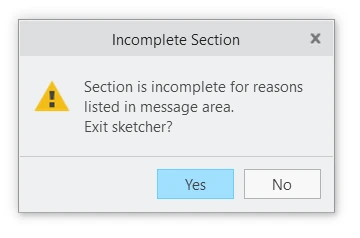
If you click YES, you lose all work done in the Internal Sketch.
Users tend to inadvertently click YES… making another mistake...
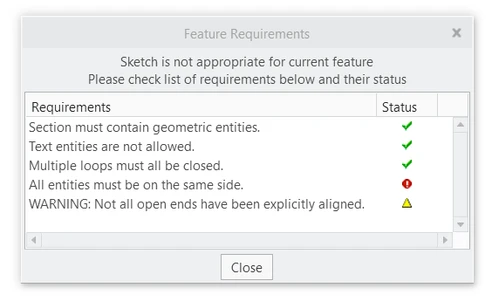
It would be great if the “Incomplete Section” window would be replaced with the “Feature Requirements” window, like the one here for an error in an Internal Sketch of a Revolve Feature:
3. Are you using a workaround? If yes, please describe it.
I click NO in the "Incomplete Section" window, but that highlighted YES button is always so tempting...
4. What is the use case for your organization? Describe how your idea would work in context or how it would apply to a practical situation.
I have been teaching Creo Parametric for years, and clicking YES in the "Incomplete Section" window is one of the most repeated mistakes by new users.
Moreover, most experienced users are not familiar with the "Feature Requirements" button.
This small change would make the software much easier to use.
5. What impact does this problem currently have on your organization? (Number of users affected, hours of lost productivity, etc.)
This is a common mistake that wastes a lot of time and unnerves all users.