
Repeat region support for multi-detail drawings (Column Models with BOM Balloons and bulk items)
1. Describe the Problem
In a drawing that details more than one model, such as an assembly with two configurations, the repeat region cannot handle it, with two major disabilities and one minor.
- No BOM balloons. According to CS102227 you cannot create BOM Balloons for a repeat region using column models. You have to create them by hand, and then they are not parametric.
- No bulk items. The quantity for bulk items is shown as 1. You cannot alter it with relations and show it as "AR" (As Required), you have to place a note over the 1 to hide it in the R. This is the kind of fakery that we are trying to avoid and should not rely on as a best practice.
- Adding columns on the edge of a repeat region puts them outside the repeat region. You have to add them inside the edge column, which makes expanding an existing table unnecessarily complicated.
Here's an example. But in this example, the workaround chosen was to add a dumb text column to the left of the repeat region, and several more rows of dumb text above the repeat region, which then makes the BOM table not sorted correctly, BUT it supports BOM balloons and bulk items.
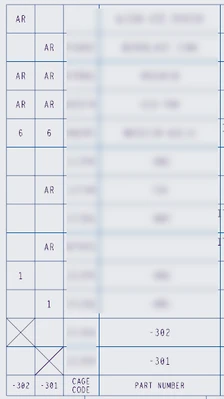
So what Creo offers is a choice. You can have a functioning parametric BOM, or you can have balloons and bulk items. But not both.
2. Are you using a workaround?
Add a column inside the first column, change the quantity columns to rpt.qty, set the column models appropriately, then put manual balloons everywhere and cover the bulk items with fake notes. OR create secondary tables with repeat regions outside the drawing borders, one for each configuration, fix the index on every item to match the index in the combined BOM, and create balloons off of them. THIS IS THE RECOMMENDATION FROM PTC! It's fakery and not parametric, either way, and it's cumbersome extra work, easily done incorrectly even with templates set up for it. The most common workaround I've seen by far is giving up, removing the repeat region and entering it all as text.
3. What is the use case for your organization?
We would use it to create our multi-detail drawings, which can have any number of configurations on the same drawing number.
4. What impact does this problem currently have on your organization?
We use multi-detail drawings a lot, but it seems like everyone has to relearn how to do it every time. Like it has to be custom built for each drawing, even with a template. And essentially it does. This is a fundamental shortcoming in Creo's drawing mode, it always has been, but that's no reason to let it always be.
Status changed to: Archived
Hello,
We are archiving your idea as part of a general review. This action is based on the age of your idea and the total number of votes received, as per this announcement.
You can always post a new idea with all the details required in the form.
Thank you for your participation.