
Oct 23, 2012 6:42 AM UTC
Archived

Repeat Region - BOM tables

Related products:Creo Parametric

I wish to appear components only in level 3 & 4 in BOM Table.

Accordingly i have filtered the repeat region with &rpt.level=3,4.

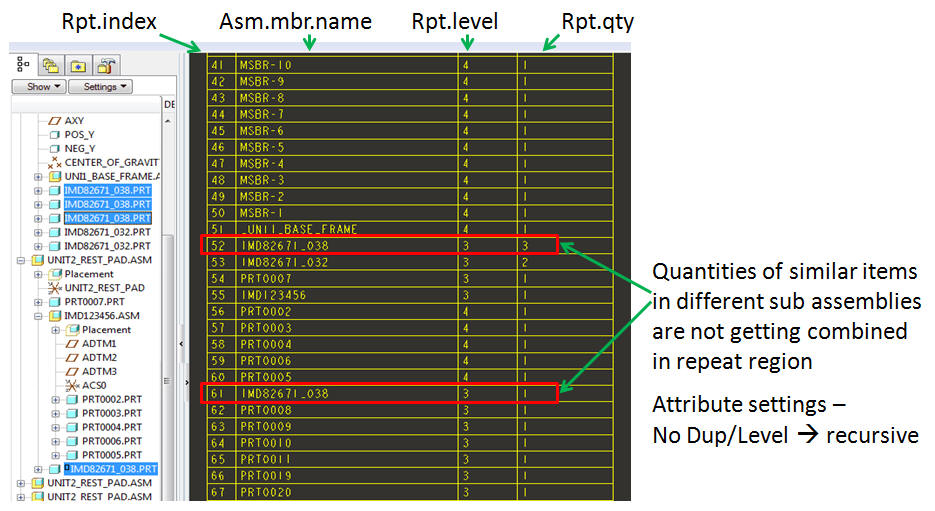
It worked. but the similar components at level 3 & 4 belonging to different sub-assemblies do not get combined in the quantities.

Refer the following snap for more details.

(WF4 M220)
1.JPG

4 replies

Oct 30, 2012 7:40 PM UTC

You can set it to No Duplicate and then it will stack up quantities from different subassemblies.

Once you set it to No Duplicate the order of parts or assemblies in your repeat region won't follow the same order as you've got in your assembly model tree.

That may require you to sort the repeat regions using Sort Regions according to a parameter defined in each model in the assembly for that purpose.

SachinAuthor
Nov 16, 2012 11:52 AM UTC

Hi Jakub,

I did the same way u explained here.

But, with this method of "No Duplicates", &rpt.level goes off.

And my requirement is to filter out the components in level 3 & 4 only.

Thus filtering the BOM table with &rpt.level do not work in this option

Nov 17, 2012 6:10 PM UTC

hi Sachin,

Ok, I see. If you use the same parts on every assembly level (1, 2, 3 and 4) then setting of the repeat region according to your needs can be very tough but it's surely possible.

Having the repeat region attribute set to No Dup/Level simply means that the items won't stack up between different levels as well as between different subassemblies. So that's not a way to go.

To be able to only show items of 3rd and 4th level you will need to define a parameter in every model called let's say LEVEL.

Now if you use same parts on different assembly levels I suggest you to use family tables where a column in the family table will contain this said LEVEL parameter as adjustable value.

To change a family table instance in your assembly to a different one use Replace command under Model tab and Operations drop-down menu.

Once the assembly is all set and all parts have got the right LEVEL parameter value, especially the ones on 3rd and 4th level, you can use filter in your repeat region such as the following one:

&asm.mbr.level == 3, 4

Also instead of &rpt.level in your repeat region table you can use &asm.mbr.level but for this to work every single component in your assembly would need to have LEVEL parameter defined. So I suggest you to use &rpt.rel.bom_level parameter and define a repeat region relations such as:

IF exists("asm_mbr_level")

BOM_LEVEL=asm_mbr_level

ELSE

BOM_LEVEL="N/A"

ENDIF

Let me know how did it go.

Mar 16, 2019 1:53 AM UTC
Status changed to: Archived