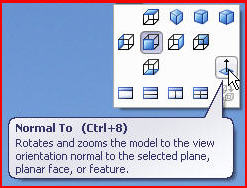
Reorient an object “normal to” a planar surface or plane
- Need new option in “Reorient” menu to be able to orient an object "Normal To" a selected plane or planar surface without a secondary reference.
- Or have an icon to directly orient an object "Normal To" a selected plane like it is possible in SolidWorks.

Actually, we use a mapkey that starts a sketched curve on a selected plane or planar surface (this automatically orient the sketch to this plane with the option sketcher_starts_in_2D yes) and then abandon the operation. The problem is if you run the mapkey on a non-checked out object it will be considered as modified.
In SolidWorks, by clicking on the "Normal To" icon in the View Orientations tool bar it will set your object normal to the screen; clicking it again will flip the sketch plane.