Sep 11, 2025 12:01 PM UTC
Archived

READ ONLY for single feature

Related products:Creo Parametric

1. Describe the Problem

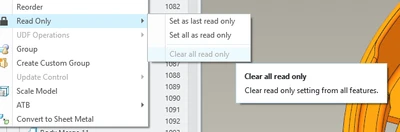
rsobecki_0-1757591518102.png

in current functionality user can only set two states:

1 - set as last read only

2 - set all as read only


I dream to have ability to set single feature as READ ONLY


like in this example:
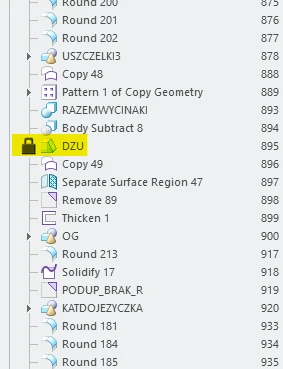
 

rsobecki_1-1757591976380.png


2. Are you using a workaround?
no way at the moment

3. What is the use case for your organization?
very often but not possible to use at the moment

4. What impact does this problem currently have on your organization?
low


Status changed to: Archived 2026-07-06

We are archiving this idea as part of a general review. This action is based on the age of your idea and the total number of votes received, as per this announcement.

You can always post a new idea with all the details required in the form.

Thank you for your participation.

This topic has been closed for replies.

5 replies

Community Manager
Sep 11, 2025 1:36 PM UTC
Status changed to: Acknowledged

Thank you @rsobecki for your idea. Based on the information you provided, we are acknowledging it as the Community management team. This is not a commitment from the Product team. Other users may comment and vote your idea up.

rsobeckiAuthor
Sep 11, 2025 2:03 PM UTC

it will be great to have an option in GEOMETRY CHECK to immediately select feature which status user will be able to set as READ ONLY - it can be another tab there 

rsobecki_1-1757599379331.png


Sep 11, 2025 5:33 PM UTC

This may be more complicated than a simple toggle of locked/unlocked.  There are many resouces available that can control features; relations, Pro/Program, Mathcad Prime integrations, shared external sketches, declarations, and so on.  What would happen when you lock a feature that needs to regenerate because of some other controlling resource?


Also, please keep in mind that the "read only" capability still allows some modification to the features.  For example, if you have a limits dimension, you can change the values of the limits even though "read only" in active.


Regards,

Dan N.

Sep 11, 2025 7:29 PM UTC

I would prefer the ability to make a feature regenerate conditionallly depending on a boolean parameter associated with the conditional regeneration.

We can achieve this functionality with Pro/Program but it's more difficult to program having to edit all that text, and specially when we create IFs with IFs. Most CAD programs have a single right mouse button to make a feature reenerate conditionally or regenerate always. I think this enhancement would be used more often and by much more users than a single read-only feature. But if PTC decides to work on one case, maybe it would not be too much more difficult to implement both functionalities.

Sep 11, 2025 7:35 PM UTC

I think that the "fence" implementation where the user marks a feature regeneration number to start the beginning of the "read only" portion of features, is that if a feature is marked as "read-only" and has children or depedent features, since the feature is not updated, any dependent features will not be updated either. Several features down the line, it would be too difficult to estimate or have a rigorous analysis of which features are independent and can be regenerated to update them parametrically, and which features have dependencies of "frozen" read-only features. To avoid potential regeneration problems and assumptions, it is better to mark all following features as read-only too. I think this makes sense.