
Apr 22, 2023 12:23 PM UTC
Acknowledged

Quick view cube

Related products:Creo Parametric

1. Describe your environment: What is your industry? What is your role in your organization? Describe your stakeholders.
Electro Mechanical company. I'm the Windchill responsible and using Creo as mechanical engineer.

We just migrated from Solid Edge to Creo


2. What version of Creo Parametric are you currently running?
7.0.2.0

3. Describe the problem you are trying to solve. Please include detailed documentation such as screenshots, images or video.
As described above we migrated our organization from SolidEdge to Creo and missing certain "basic" functions which were available there.

One of the features we are missing is the "Quick view cube" which was available there.
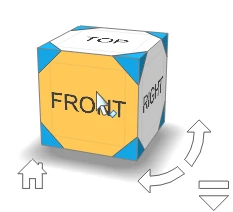


tipsquickview-1.png

A simple cube in any corner, rotating with the displayed model. When clicking on the cube, the view oriented as selected, so in above example it would then orient to the Front view.


4. What is the use case for your organization?
Especially in bigger assemblies you are quickly lost how you are looking right now at the model or you just want to very quick orient it in a certain manner, e.g. looking at an angle of 45° at the back top edge.


Here you see all the available options:
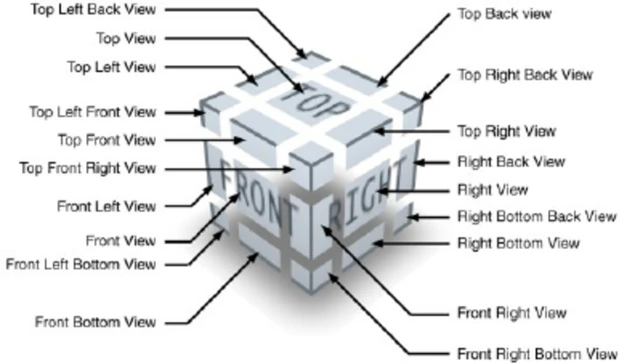
The-Glass-Cube-has-a-complex-set-of-controls-14-selectable-viewpoints-green-arrows-and.png

5. What business value would your suggestion represent for your organization?

Basically it's a matter of effiecency and user friendliness, not needing to save and each and every possible view in a table, but have it in a graphical way available.

8 replies

Apr 24, 2023 6:30 AM UTC
Status changed to: Acknowledged

Hi @CHENAMA!

Thank you for your idea. Based on the information you provided, we are acknowledging it as the Community management team. This is not a commitment from the Product team. Other users may comment and vote your idea up.

Apr 24, 2023 7:29 PM UTC

I fully agree.

Even though Creo is customizable, or we can use mapkeys to quickly create views, it does not make sense for the lack of this needed and basic functionality out of the box.

The problem is that Creo does not even include a "standard" coordsys to base the views orientation on. Again, it can be included in the templates.some have it, others don't (have only 3 default planes as 3 features).

In my humble opinion, Creo should come with a Standard Coordsys feature on every part, as a first feature on the part per se, and not optionally in the templates. This Default Coordsys should have the possibility to be offsett from 0, 0, 0, and reoriented if needed. Then, the default views orientation, or view cube, could be derived from this first default coordsys.


Also, since Solid Edge has it, like almost any CAD package this days, make the CSYS a "componsite feature" with implicit 3 selectable planes for the default X, Y or Z plane orientation to be able to imediatly sketch, avoiding the uneeded and "time consuming" task of creating manually 3 offset planes from the CSYS, specigying three 0 offset values, adding 3 uneeded features, and having to stretch the user imagination to name the 3 datum planes. Meaning, each CSYS on the model tree, and on the graphics area, should automatically have 3 selectable implicit planes named X, Y, Z. Like it exists in Catia, NX, Solid Edge, Solid Works, Top Solid, etc.


May 15, 2023 1:43 PM UTC

More or less what I've posted here more than 6 years ago... with not a great result

Jun 20, 2023 7:27 AM UTC

@CHENAMA If the Quick View Cube is something that already persists in Solid Edge it is maybe protected by a patent and can't be implemented that easily?

CHENAMAAuthor
Jun 21, 2023 8:05 PM UTC

@OliverHeins at least it's something which is also available in a very similar way in autodesk as well: https://help.autodesk.com/view/NAV/2023/ENU/?guid=GUID-AEC7DA90-2605-47B5-A113-5BF8E27096C9


I'm the wrong to answer if there are any patents, but that would be an explaining response from PTC why such a (in my opinion) very basic feature is not available in a high end CAD.

Oct 11, 2025 11:32 AM UTC

I think that is not a matter of patent because Creo View Web 12.1 has a kind of "view cube" now:


view.png


Oct 12, 2025 8:00 AM UTC

Why not put it inside Creo Pareametric then?

Oct 14, 2025 12:40 AM UTC

If PTC finally does go forward and implement this much requested and needed feature, I hope that they also provide the possibility to have a config.pro option to specify which orientation the view cube considers the TOP direction. As @Trebla has shown in the provided image, in  Creo View it seems that they considered the Y axis direction as the TOP view and Z axis direction the FRONT view. There are lots of software and 3D users that are used to consider the +Z plane the TOP direction, and -Y the FRONT direction. Different companies might have different standard. We in our templates considered always the Z plane as the TOP direction, and would like to have the possibility to configure the software to provide this flexibility instead of imposing a specific "standard" for the view-cube orientations or view names.