
Pulling Data off of a CREO Parametric Drawing Wirelist Schematic Sketch in into Excell or Xpedition
Please include detailed documentation such as screenshots, images or video.
1. What product and version are you running?
CREO PARAMETRIC 9.0.7.0
2. What is the problem?
We have hand drawn wirelist schematics on a page of a cable drawing to show how a cable is hooked up. It is not a CREO schematic program it is only lines on a page depicting wires in a cable with connections to connectors on each end of a wire. There is text on the drawing that indicates wire numbers and signal/net name and AWG of wire. The text is not intelligently linked to the drawn lines depicting wires in the cable.
I want to automatically pull off the information off of the drawing and determine from the drawn lines where the signal/net names go from point to point (connectors) from the graphical drawing.
We currently cannot just pull off data from a CREO drawing like this and put the data in any kind of format like a table that represent the layout on the drawing. We also cannot pull off data from a generated PDF from CREO. When you select data off of a drawing the order when copied and pasted is ridiculously mixed up when pasted.
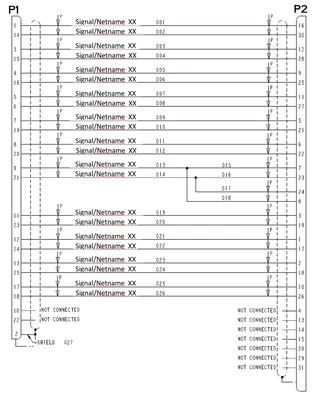
So We would like to be able to have CREO provide a way to pull the information off of the drawing to be exported to a TABLE to start like this:
P1-1 Signal/Netname XX 001 P2-16
P1-14 Signal/Netname XX 001 P2-30
P1-3 Signal/Netname XX 001 P2-12
P1-15 Signal/Netname XX 001 P2-28 etc….
Maybe pulling text in a selected area and keeping the horizontal orientation when pasted into Excel so that we can get the data in order as to what was presented in the drawing. It would be nice if CREO could use some AI function to determine that the connections are accurate and assigned the correct signal name.
The next step would be to export a format that could be imported into xpedition that would generate an intelligent drawing with a connector pins connected with a trace/signal name.
3. Are you using a workaround? If yes, please describe it.
This is one of the current lousy time consuming methods we use to pull data from a unintelligent CREO Drawing:
Current method I have been using after consultation with CREO guru’s is less than efficient and I have sent messages to Digital transformation about this. Crickets.
Pulling wirelists or any tables off of windchill drawings that are saved as PDF does not work directly so after some consultation with CREO and PDF gurus a way of doing it was created.
- You have to go into CREO and copy what you want onto its own sheet then save off as a searchable PDF so when the wirelist appears on it’s own sheet you can pull off the data.
- Go into CREO select World icon lower left
- Open workspace search for drawing you want
- open content to find Creo drawing ICON
- Copy portion of wirelist onto new page in Creo then export as searchable pdf
- As a PDF you can pull of text in order from the page you created
- This is an exceptional waste of engineers time and AI should have a way of directly pulling data like that from drawings and keeping the format eg tables/excell.
Also have tried :
- There may be some data extraction tools like https://nanonets.com/blog/extract-data-from-pdf
and possibly Kofax that would allow pulling data off of a PDF generated from CREO or other formats and converting to an EXcel file in order to manipulate that excel file data to create intelligent drawings in another platform like xpedition.
Also tried KOFAX PDF but with limited results always requiring significant editing which is prone to user input error.
4. What is the use case for your organization? Describe how your idea would work in context or how it would apply to a practical situation.
We have 1000's of CREO drawings that have Netlist/wirelist just drawn in an unintelligent format of just lines, text and pin numbers that have no link to each other except through Visual or a graphical representation. If there was an automated way to pull off that information and readily import into an Excel, Xpedition, Zuken or Hyperlynx formats that would be extremely helpful and reduce Human Error.
5. What impact does this problem currently have on your organization? (Number of users affected, hours of lost productivity, etc.)
Currently if we wanted to upgrade to linked Zuken schematics on CREO we would have to hand redraw the schematic of the cables into Zuken which increases the potential for human error and is a huge Labor waste.
If we wanted to upgrade to CREO schematic module on CREO we would have to hand redraw the schematic of the cables into CREO Schematic which increases the potential for human error and is a huge Labor waste.
If we wanted to pull a wirelist from a CREO drawing into Excel we can pull some sections off of the CREO drawing but the data is always scrambled and requires detailed editing to confirm it is correct which increases the potential for human error and is a huge Labor waste.