Nov 8, 2012 8:07 PM UTC
Archived

Publishing Option - Need Shrink-Wrap Geometry Published as Model Geometry

Related products:Creo Parametric

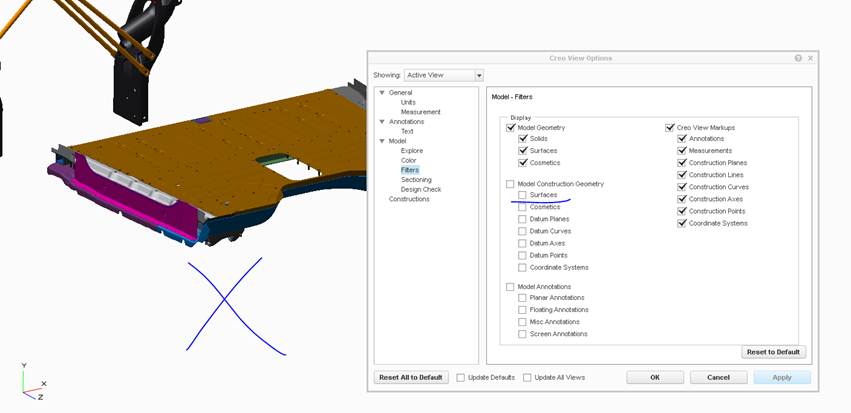
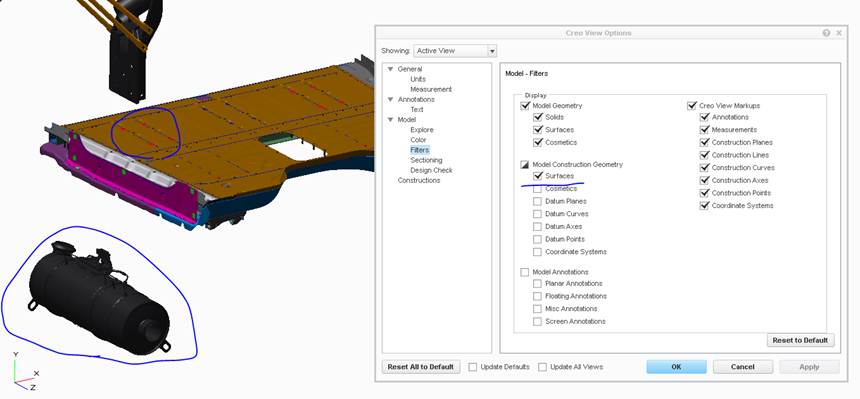
Our large assemblies in Pro-E often include shrink-wrap objects of supplier assemblies like engines, transmissions and aftertreatment devices.  When looking at these large assemblies in Creo View, we have to toggle on "construction surface geometry" to see these objects treated as Model Geometry in our Pro-E assemblies.  I'm proposing PTC add a publishing option in the Recipe file to have shrink-wrap geometry published as Model Geometry.

The two images below show the issue with the settings.  I need a solution that shows the aftertreatment device(shrink-wrap) without seeing the red construction surfaces in the floor(items circled).   Also Reference PTC case 11068618.
issue-with-geometry.jpg

issue-without-geometry.jpg 

6 replies

BillRyanAuthor
Apr 29, 2016 6:30 PM UTC

The compare function does not work with Shrink-wrap parts either. Creo View 3.1 F0000 thinks these are identical.

compare-shrinkwrap.JPG

BillRyanAuthor
May 23, 2016 8:25 PM UTC

As currently designed, shrink-wrap geometry CAN NOT be viewed on Creo View Mobile because it doesn't have filters like the desktop version to turn on this type of data.

Creo View Mobile - Model Construction Geometry Surfaces

BillRyanAuthor
Jan 23, 2017 11:20 AM UTC

I've also confirmed that Thingworx Studio(version 1.8) and thus any Augmented Reality experiences for Mobile does not have a solution for Shrinkwrap.

Jun 14, 2018 8:40 PM UTC
Status changed to: Acknowledged
BillRyanAuthor
Jan 28, 2021 4:33 PM UTC

This is implemented from my testing and settings we now have in place.

olivierlp
Community Manager
Jan 4, 2022 2:20 PM UTC
Status changed to: Archived

Hello,

We are archiving your idea as part of a general review. This action is based on the age of your idea and the total number of votes received, as per this announcement.

You can always post a new idea with all the details required in the form.

Thank you for your participation.

Olivier