
Dec 8, 2016 9:51 AM UTC
Archived

pattern with moving faces

Related products:Creo Parametric

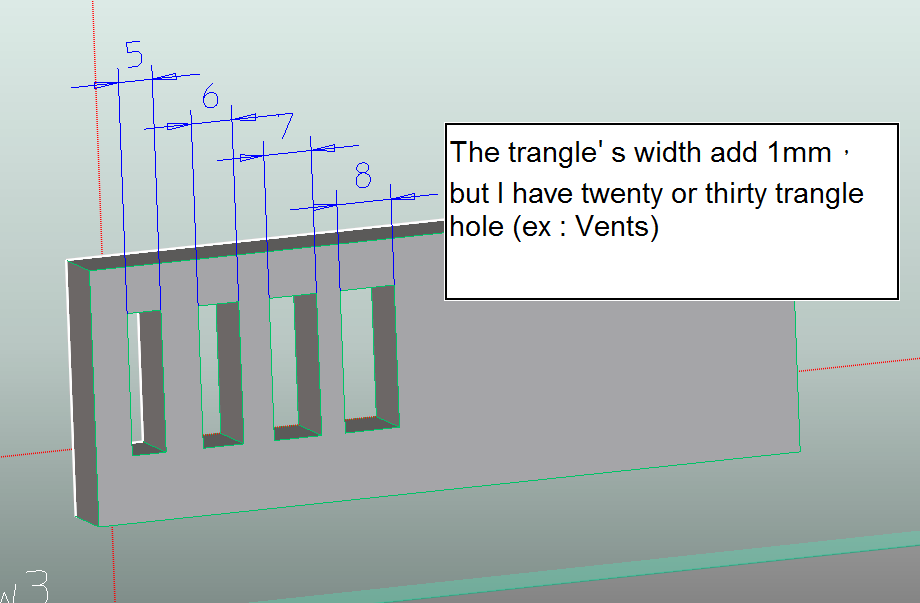
Some situations need to create the same form ,but their width or length is different

Bellow picture
1.png

I can pattern a lot of hole, but I need to move their face to n+1mm one by one.

Maybe the pattern can pattern the same form and change their width or length.

Like creo parameter pattern function.

5 replies

Dec 9, 2016 6:56 AM UTC

Select both dimensions (Ctrl + LMB) for the pattern. You can choose different increments for each Dimension.

Dec 9, 2016 9:05 AM UTC

Hello,

Right, idem with captures to follow the creation process

Feature creation + pattern

Selection first pattern direction (5 mm from the vertical side)

Enter pattern step, (here 10)

Enter number of repetitions and validade

Capture-2.JPG

Press CTRL and select second dimension (here width), then enter pattern step for this dimension

(1 element(s) becomes 2 element(s))

Capture-3.JPG

Voilà!

5 different shapes: step of 10 mm and +1 mm by repetition (from 5 to 10 mm wide)

Capture-4.JPG

Pierre

yhuang-2Author
Dec 12, 2016 1:18 AM UTC

Hi,

The function is Creo parametric not Creo elements direct.

Creo elements direct need the function for the picture

yhuang-2Author
Dec 12, 2016 1:24 AM UTC

Hi,

The dimensions is refered and it is still modified one by one.

I need change once. Because I change twenty or a lot of holes.

olivierlp
Community Manager
Jan 4, 2022 3:15 PM UTC
Status changed to: Archived

Hello,

We are archiving your idea as part of a general review. This action is based on the age of your idea and the total number of votes received, as per this announcement.

You can always post a new idea with all the details required in the form.

Thank you for your participation.

Olivier