
Sep 29, 2014 11:04 AM UTC
Acknowledged

Option that specifies the default Coordinate System when importing STEP or IGES files

Related products:Creo Parametric

We would need (here in Europe specially?) an option that specifies the default coordinate of our template when importing STEP or IGES files.

Actually, a majority of files are wrongly imported tipped on the side.

We systematically have to re-specify the coordinate system to obtain the correct “standing up” position (though Z vertical coordinates -> Europe ?).

A couple of config.pro options exist for ECAD files:

ecad_comp_csys_def_name: Specifies the default coordinate system name added to an ECAD component being imported or exported

ecad_board_csys_def_name: Specifies the default coordinate system name added to an ECAD board being exported or imported

Please allow this type of import option for STEP and IGES
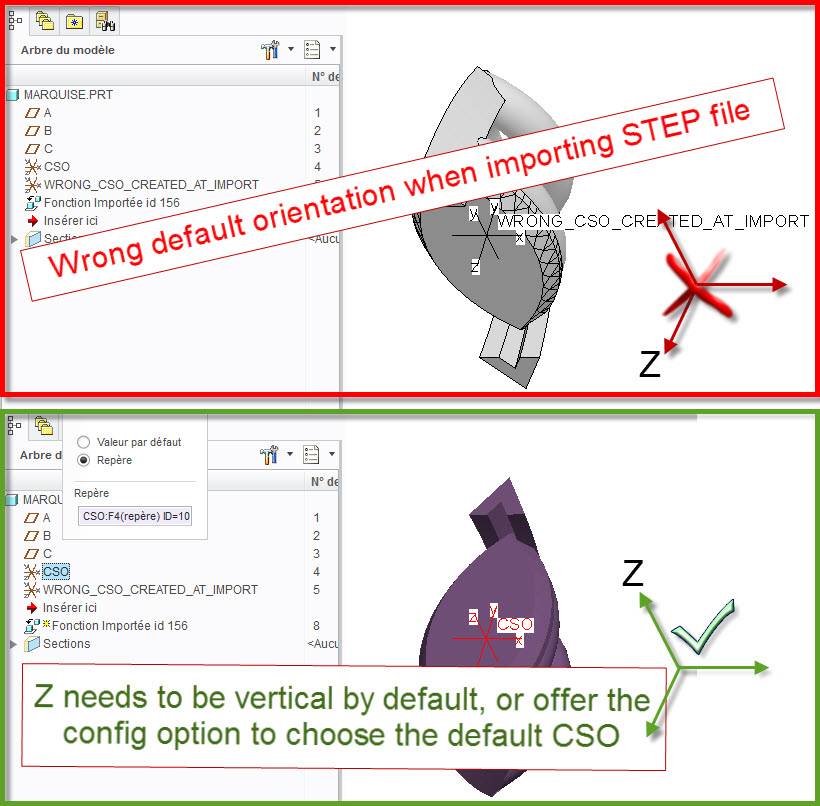
CSO import STEP.jpg

4 replies

Sep 29, 2014 12:06 PM UTC

My default templates (customized) for both parts and assemblies have an "IMPORT_REF1" coordiante system - created by referencing the PRT_CSYS_DEF or ASM_CSYS_DEF respectively.  I reference the IMPORT_REF1 CSYS for all imported geometry - thus making each easily re-oriented and re-positioned as needed. I have used this work-around for over 10 years - since there is no predicting the default CSYS for geometries from various sources.

IMPORT_REF1.JPG

Sep 30, 2014 3:48 AM UTC

If you bring individual parts into an existing part you are given the option to choose a coordinate system.  In this case, just choose something other than the automatically created on the fly through the "hidden" default coordinate system.

If you are creating a new assembly from neutral data (with its related parts), you don't have the ability to choose a coordinate system but you do have the option to choose what template parts are used.  I'd recommend you create a set of 'Z-up' start parts (part and assembly) and use these during the import.  This will make sure that the coordinate system is oriented correctly and the views are named correctly.

Sep 30, 2014 3:56 AM UTC

By the way, I'd be willing to guess that the coordinate system in your current start part doesn't agree with the built in "hidden" coordinate system.  To check, create a "Default Coordinate System".  Wherever this points is how all import data will naturally be oriented.

Long term, you might be better off recreating your start part with Z up (plane names, view orientations), and then reconfigure the software accordingly (default orientation, reflection angles, light direction, etc.).  This solves so many logical annoyances if you are used to working in a Z-up world.  It CAN be done!  The trouble of course is, what do you do with everything that already exists...

Jun 14, 2018 7:10 PM UTC
Status changed to: Acknowledged