
Feb 5, 2013 12:16 PM UTC
Archived

Open a file "As stored" directly inside Creo

Related products:Creo Parametric

Dear PTC Team / Community,


We wish to suggest a modification concerning the system behaviour when opening files directly inside Creo (Menu -> File -> Open).


Today, using this method, the file will always open "as latest" (please see the sketch attached below).


We would like to have an option to open the file "as stored" directly inside Creo (Menu -> File -> Open).


If you have any questions, please let us know.


Best Regards,

ThyssenKrupp Fördertechnik Latino Americana Team

Bruno Castro (bruno.castro@tkfla.com.br) and Dr. Obretinow (roland.obretinow@tkfla.com.br)
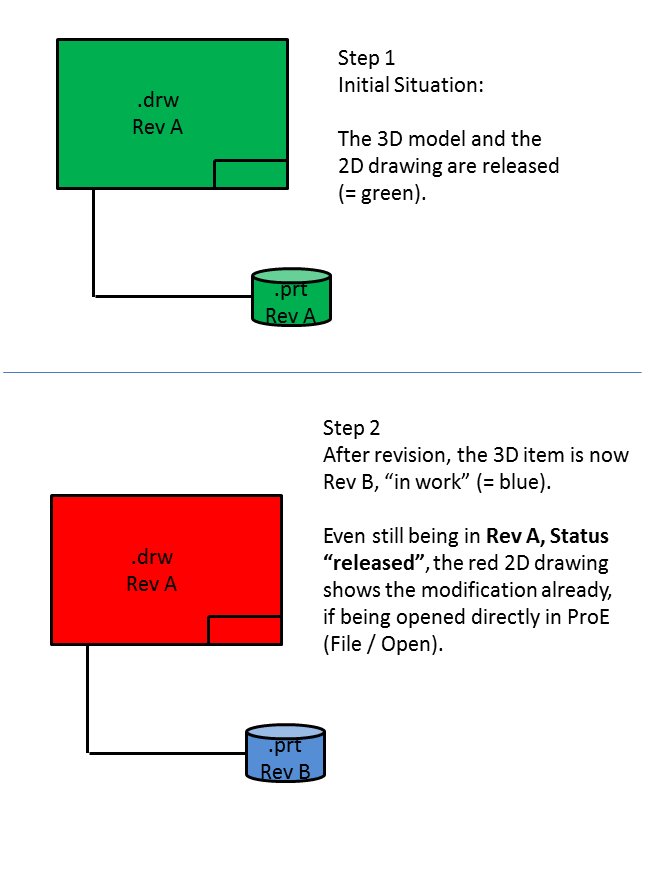


image_content_fixation.jpg

3 replies

Aug 30, 2014 7:48 PM UTC

I suggest if the status will be different during openning as it was as stored then Creo should ask user if he wish to open the drawing "as stored" - old version in general and maybe in the fly show the defferences

Aug 25, 2015 11:32 AM UTC

This depends on the current Workspace setting.

Default behaviour is as follows:

  • If the object you're about to open is the latest one, then Latest configuration is used
  • If the object you're about to open is not the latest one, then As-Stored configuration is used

You can change this by editing the preferences of the active workspace.

olivierlp
Community Manager
Jan 4, 2022 1:54 PM UTC
Status changed to: Archived

Hello,

We are archiving your idea as part of a general review. This action is based on the age of your idea and the total number of votes received, as per this announcement.

You can always post a new idea with all the details required in the form.

Thank you for your participation.

Olivier