
Acknowledged
New Drawing using drawing template WITHOUT any 3D model
This topic has not been fixed within the last 25 years so I make another attempt here 😉:
- When creating a new drawing with the drawing template:
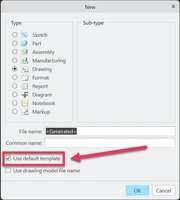
- You cannot click OK without selecting a 3D model - the button is inactive:
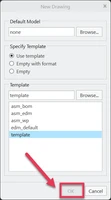
There are many use cases where this makes no sense:
- Import of 2D IGES or DXF data into the drawing
- A drawing that contains only notes and tables
- A user just wants to start a drawing, place the drawing frame but doesn't have the 3D model from his colleague yet.
Since using the template is not possible in those scenarios users tend to select "Empty" to activate the OK button. By doing so they don't use our template and therefore don't have any parameters for the drawing frame. This results in Creo asking for a value for every parameter in the drawing frame when you place it thereby overwriting the parameter with simple text making the drawing frame non associative. All because Creo forces you to select a 3D model when creating a drawing from template.
Please fix this nuisance once and for all ! It doesn't help - it just leads to unnecessary work and confusion.