
Mar 21, 2013 1:57 PM UTC
Archived

Modeling - Ribbon UI - change color scheme

Related products:Creo Parametric

With the following unsupportet switch, the color scheme can be changed:

(uib::win-set-skin-style :silver)
(uib::win-set-skin-style :black)

(uib::win-set-skin-style :blue)

(uib::win-set-skin-style :creo)

This should be a standart function.
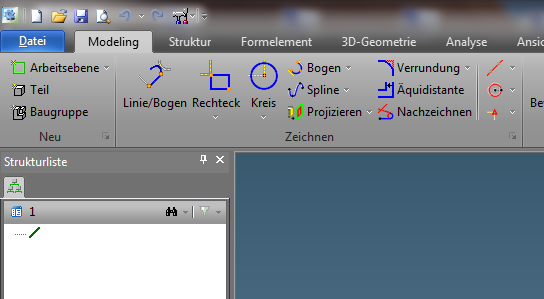
20-03-2013 18-04-54.bmp

9 replies

Mar 26, 2013 10:45 AM UTC

very cool. i just have an issue when i change to silver, black or blue in modeling module and i have a drawing open in annotation. then my annotation viewport does not maximize correctly anymore.

restarting annotation module resolves the issue.

the issue also appears in the other direction (changing in annotation gives same issue in modeling module) but here it can be fixed by creating a new viewport.

seems like it just needs a little bug fixing, but i do love this functionality.

Mar 27, 2013 4:12 PM UTC

The same colors would be also nice in the UI of Model Manager - not only Modeling!

Apr 10, 2013 5:26 PM UTC

how do you use that switch?

sreinboldAuthor
Apr 11, 2013 10:55 AM UTC

We have added the following lisp in the toolbox:

(in-package  :custom)
(use-package :oli)

(sd-defdialog 'CHANGE_UI_COLOR
  :dialog-title  (sd-multi-lang-string "ui-change-color" :german "UI Farbe wechseln" :schinese "ui_change-color")
  :toolbox-button t 

  :variables
  '(
    (creo 
       :title (sd-multi-lang-string "creo standard" :german "Creo Standard" :schinese "creo standard")
    :push-action
   (uib::win-set-skin-style :creo))
(blue 
       :title (sd-multi-lang-string "blue" :german "blau" :schinese "blue")
    :push-action
   (uib::win-set-skin-style :blue))
(silver 
       :title (sd-multi-lang-string "silver" :german "silber" :schinese "silver")
    :push-action
   (uib::win-set-skin-style :silver))
  
(black 
      :title (sd-multi-lang-string "black" :german "schwarz" :schinese "black")
    :push-action
   (uib::win-set-skin-style :black))
   )
)

May 16, 2013 1:07 PM UTC

Still wondering how do you use the switch?  Where do you enter those strings?

Thanks.

Aug 6, 2013 3:35 PM UTC

Type it in the command line. command-line.JPG

Oct 15, 2014 5:30 PM UTC

How do you enable the command line?

Jun 14, 2018 8:32 PM UTC
Status changed to: Acknowledged
olivierlp
Community Manager
Jan 4, 2022 2:15 PM UTC
Status changed to: Archived

Hello,

We are archiving your idea as part of a general review. This action is based on the age of your idea and the total number of votes received, as per this announcement.

You can always post a new idea with all the details required in the form.

Thank you for your participation.

Olivier