
Modelcheck errors - spelling, lowercase, font... to work with DIMENSION TEXT!
Please include detailed documentation such as screenshots, images or video.
1. What product and version are you running?
Creo Parametric 9.0.7.0
2. What is the problem?
Reference ticket: 17231654
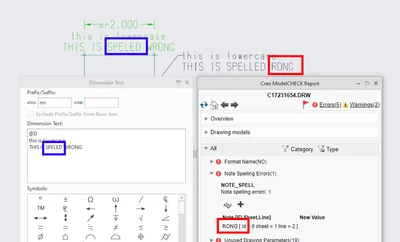
Modelcheck includes checks that 'check' for spelling errors, lowercase letters, incorrect font...etc. However, they only work for notes and tables! They do not actually check for words in Dimension Text! Anyone can write anything and the system won't flag it!
3. Are you using a workaround? If yes, please describe it.
Praying that no one makes mistakes when they enter text in dimensions! (not working!)
4. What is the use case for your organization? Describe how your idea would work in context or how it would apply to a practical situation.
It would fill a major gap in the modelcheck functionality for these checks. When we setup modelcheck to look for spelling mistakes, etc... it does what we expect it to do!
5. What impact does this problem currently have on your organization? (Number of users affected, hours of lost productivity, etc.)
Impacts over 50 users and hundreds of downstream individuals who consume the drawings. Drawings are being released with issues or are being sent back around to be fixed, slowing down our release process.