
Model info that displays on the top bar, to be configurable.
We have a section of our business that now run Creo as a standalone, using legacy data that was originally created in Intralink/Windchill.
These legacy models when opened will display their REV and RELEASE LEVEL at the top of the screen.
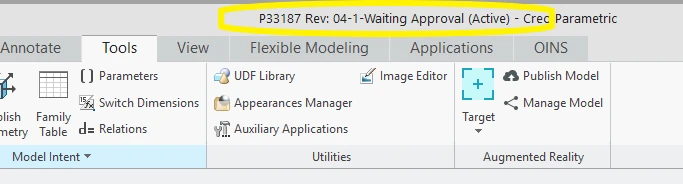
I've concluded they are driven by the parameters PDMDB, PDMREV and PDMRL.
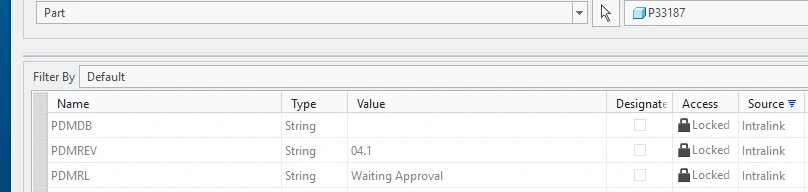
When creating new parts outside of Windchill, these parameters are obviously not automatically created. If you try to create them, Creo will deny and tell you that they are reserved.
To get round this I added config option 'allow_create_pdm_param=yes'. Now I can create the PDMRL and PDMREV parameters manually and add some values - Creo then populates those values at the top of the screen
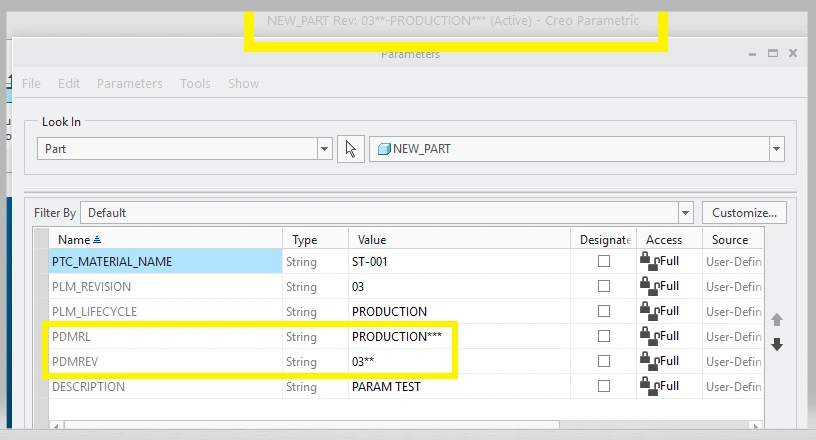
Inquiries with support suggest this is hard-coded to PDMRL/REV.
It would be good if we could change this and select which parameter(s) appear.