Delivered
MBD – diameter dimension
In Creo Parametric, to design a cylinder 2 options are avaible:
- Extrude a circle
- Revolve a rectangle
In first case, diameter dimension is obtained in sketch by double clicks on the circle (a simple click gives radius dimension)
In second case, diameter dimension is obtained in sketch by 3 clicks (line-axis-line)
For this 2 cases, in associated drawing this 2 kinds of dimensions can be showed on any view we want (front, top, right,…)
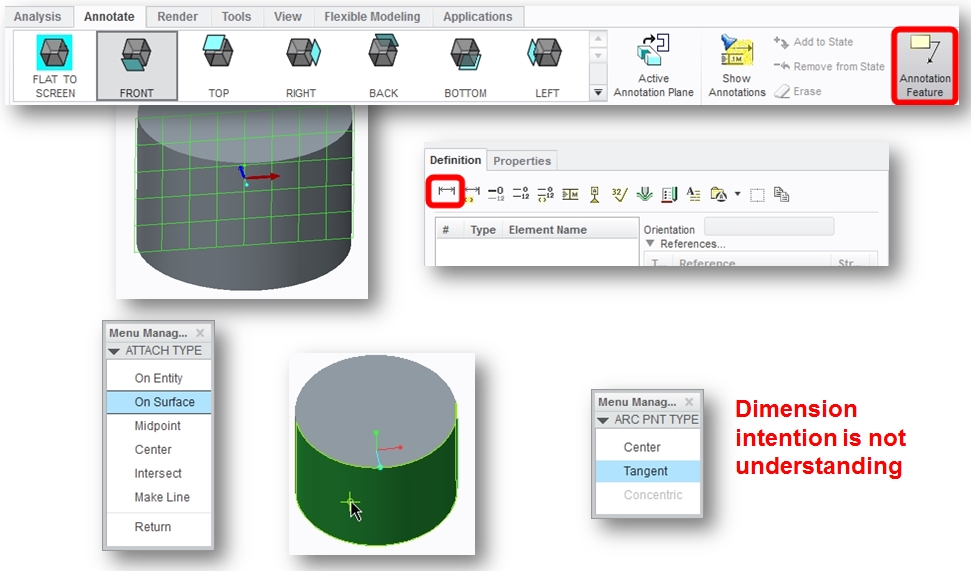
Using MBD, #Annotation Feature #Create a driven dimension the behavior should be similar
- MBD current behavior
- if dimension is created in top view, in drawing dimension can’t be move to front view
- If dimension is created in front view, Ø symbol is not added in prefix dimension, and in drawing dimension can’t be move to top view (or other view)