Make the Solidfy Feature option Replace Surface auto-hide the used quilt
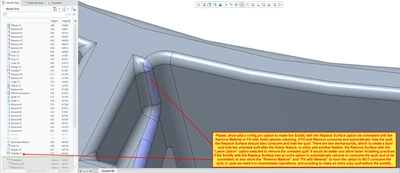
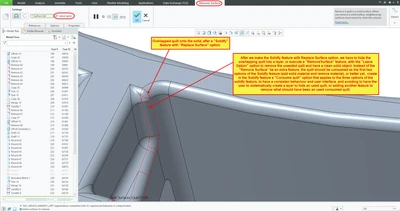
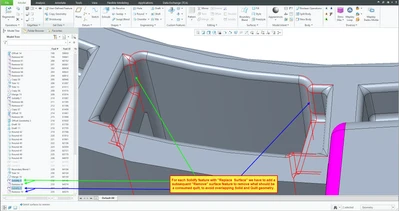
Problem: We use a lot the solidify feature in regular modeling practices, specially the third option of the solidfy feature, which is the "Replace surface" (ancient Tweak Replace with quilt). Every time we used the feature, we had to imediatly create an extra-layer, if it wasn't already present, to hide what should have been a consumed quilt. The first two options of the "Solidfy" feature, "Fill with solid" and "Remove material" always consume the quilt, so we don't need to create a layer to hide the quilt. Why didn't the third option, "Replace surface" didn't follow the same behaviour, and kept the quilt? It's even more anyoing, since in 95% of the time we will not use the quilt for anything else, so we have to create a layer to hide it, slowing us down, or create an extra feature, the "Remove surface" feature, not forgetting to imediatly selecting an extra option, "Leave Open", just to remove which in 95% of the time should have been a consumed quilt of the solidfy feature. This inconsistent behaviour is annoying, slows experienced users in the modeling process, and baffles novice users with inconsistent behaviour of the same feature (Consuming or not a referenced quilt).
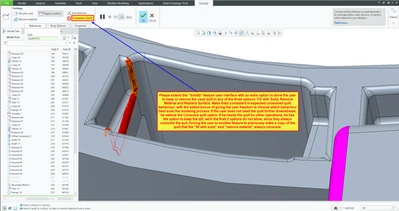
Proposal: Keep existing behaviour as an option, but also add a config.pro option to make the solidfy feature have an extra option to allow the user consume or keep the referenced quilt when using any of the three sub-options of the Solidf feature, making all three options consistent, and allow the user to speed up common modeling practices. See the last image.
Please see the attached images to better illustrate the idea. Thank you.