
Make Shrinkwrap quality more scalable to data size/complexity
1. Describe your environment: What is your industry? What is your role in your organization? Describe your stakeholders.
Automotive OEM with 500+ CAD seats. I´m responsible for CAD methodics. Stakeholders: Mechanical design, mockup, data exchange with other departments / supplyers using 3rd party CAD systems as well.
2. What version of Creo Parametric are you currently running?
7 & 8
3. Describe the problem you are trying to solve. Please include detailed documentation such as screenshots, images or video.
This product idea is a response to PTC case C16442478
https://www.ptc.com/appserver/cs/view/case.jsp?n=16442478
We use shrinkwraps (SW) for simplifying engine and transmission assemblies. Additionally it is a way to go for know-how- protection, too.
We found out, that there is a dependency of surface quality of the resulting shrinkwrap and the amount and complexity and even bounding box of the regarded assembly.
Even SW- quality can be influenced by some user actions, from a certain complexity of data sets, SW get a very poor quality.
Please refer to case for some examples of surfaces before and after Shrinkwrap creation.
SW quality gets a lot worse, if...
....original assembly has more components,
....original assembly has more complex components,
....original assembly has a bigger bounding box,
Test data shown below was provided by PTC.
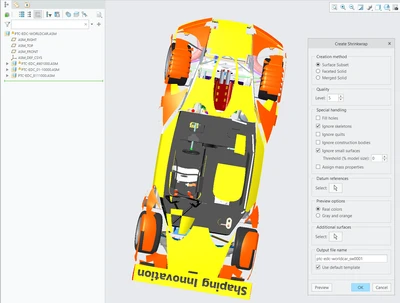
Result with same settings but bigger bounding box:
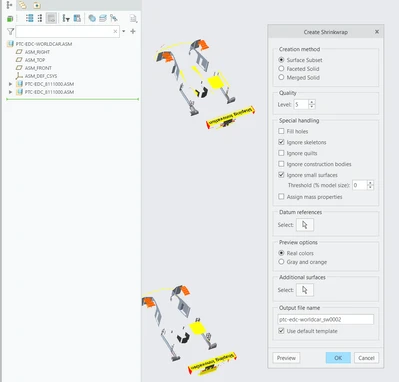
From a certain data size and complexity, for us, the result cannot be used für mockups in whole vehicles, as large surface sets are removed during SW creation. This leads to untrue distance measurements or even indicate free space where originally periferical parts are located but not shown.
4. What is the use case for your organization?
It would be great to have a new control option to influence SW creation method. Perhaps the amount of total / kept surfaces could be controlled by user, while classic options (e.g. "Level") keep same values, Last step is importatnt to us, as we must apply same SW level throughout all of our data sets.
5. What business value would your suggestion represent for your organization?
....Better SW quality would deliver higher resoulution of result and showing the true shape of assemblies.
...More "closed" surface regions in result.
... Another key to control data size and resultion of SW
... We could keep our deafault SW settings and apply them to all of our data sets