
Mar 25, 2013 9:04 AM UTC
Archived

Make it easier to Open a Mold asm without Mold Licence

Related products:Creo Parametric

To open a Mold asm only in ASM mode (without using a Mold License) is only possible
with a special config.pro option (allow_asm_in_assem_mode). If this option is set to yes,
a new method to open files appears in the file open dialog (Open in Assembly mode).
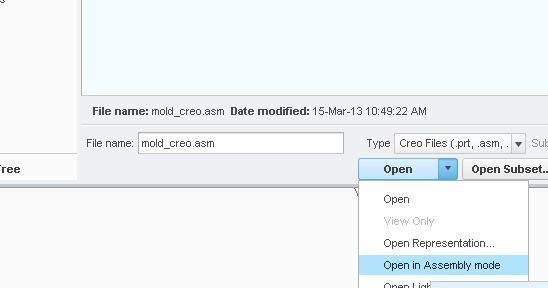
 

file_mold.jpg


It would be easier without an extra menue entry in the dialog if creo recognises that there is no

Mold License and automatically opens the asm in asm mode instead showing an error only.

5 replies

Jan 24, 2014 10:51 PM UTC

What release & version of software are you using? Config option (allow_asm_in_assem_mode) does not work for me in Creo 2.0 M090.

Jan 27, 2014 8:43 AM UTC

We use the Creo 2.0 M060 right now. We have an Call for these issue. Even if it would work why should the user select a different way to open the model? It should work automaticaly.

May 28, 2014 2:14 PM UTC

The option is allow_mfg_in_assem_mode to yes referring to article at https://www.ptc.com/appserver/cs/view/solution.jsp?n=CS67592

Mar 16, 2019 2:35 AM UTC
Status changed to: Archived
Mar 16, 2019 2:36 AM UTC
Status changed to: Archived