
Apr 7, 2022 7:29 AM UTC
Acknowledged

Make different icons for instance and generics in feature tree

Related products:Creo Parametric

1. Describe your environment: What is your industry? What is your role in your organization? Describe your stakeholders.
Construction, lead engineer and administrator of Windchill and Creo


2. What version of Creo Parametric are you currently running?
7.0.5.0

3. Describe the problem you are trying to solve. Please include detailed documentation such as screenshots, images or video.
In the workspace you have different icons for a generic, instance and normal part or assembly.
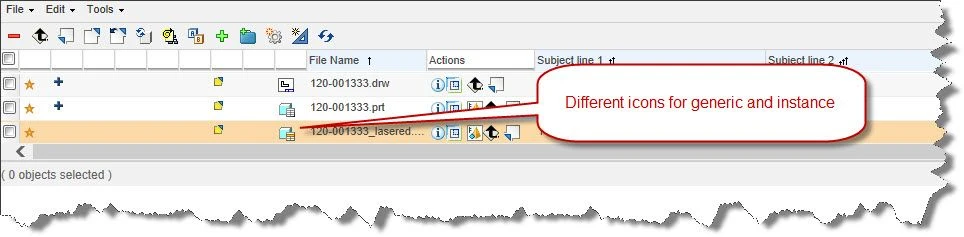
Icon in workspace.jpg
In the feature tree there is no different icon for instances or generic.
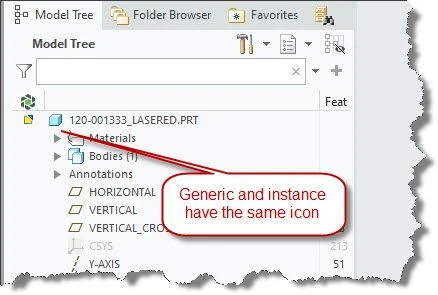
Icon in feature tree.jpg
4. What is the use case for your organization?
Easier to see when you have an instance open or a generic.

5. What business value would your suggestion represent for your organization?
More harmonized and for the user faster to see if there is a generic or instance open.

5 replies

Apr 7, 2022 11:07 AM UTC

Has this changed from previous versions of Creo? I'm using Creo 4.0 and when I have an instance open, the label in the bottom left corner of the screen says "Instance: MODEL_NAME" and the name at the top of the model tree is of the format "INSTANCE <GENERIC_MODEL>". Thus I always know I'm looking at an instance.

RobertHAuthor
Apr 7, 2022 11:22 AM UTC

@KenFarley , haha I'm work with Creo (or even Wildfire) for more than 13 years now and never noticed that 🙂


Note instance.jpgNote generic.jpg

But still I prefer the icons in the feature tree will be the same as the icons in the workspace.

olivierlp
Community Manager
Apr 7, 2022 3:55 PM UTC
Status changed to: Acknowledged
Olivier
olivierlp
Community Manager
Apr 7, 2022 3:56 PM UTC

Hello, 

Thank you for your idea and the information you provided.

Olivier
Apr 7, 2022 4:05 PM UTC

Yes! this is important