
Apr 30, 2021 12:28 PM UTC
Acknowledged

Make default behaviour of Copy Geometry configurable

Related products:Creo Parametric

There are quite a few options inside the copy geometry feature:
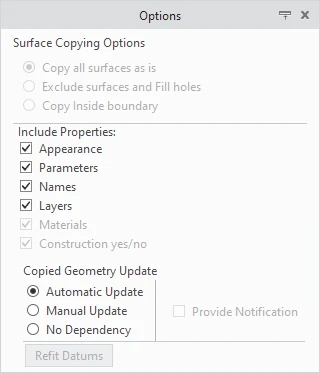
JW2_0-1619785540081.png

The idea is to allow the admin somehow ,e. g. config.pro, to control which checkboxes are activated by default.

Especially the unchecking of Appearance would make life easier for some use-cases


10 replies

May 23, 2023 3:10 PM UTC

At least please add two buttons more. One for selecting all options, and one to deselect all options.

Sometimes we need all or almost all options activated, but the next time we might need only one option. When we do Copy geometry repeatedly for several parts, its frustrating to have to constantly click each checkbox one by one. Similar to the model tree node expansion or collapse... one can click each node individually, but Creo also has a button to collapse all or none.

Aug 7, 2024 6:22 PM UTC

An alternative would be to keep the last used selections when using copy geometry again, ie, make the settings persistent between command invocations instead of resetting to the default values (all selected).

Aug 7, 2024 6:26 PM UTC

At the last PTC/User session PTC talked about allowing users to save default radio box options for all of the ribbons. These would be saved to the .ui file so you may get your wish that way.

Community Manager
Feb 12, 2025 9:52 AM UTC
Status changed to: Acknowledged

Hello,

Thank you for your idea. Based on the details and popularity of your idea, we are acknowledging it as the Community management team. This is not a commitment from the Product team.

JW2Author
Feb 12, 2025 10:27 AM UTC

@Catalina Is this idea solvable by the presets for features that will be added with Creo 12. If yes it would be highly appreciated to include the Copy Geometry into the first features that get presets.

Feb 12, 2025 1:27 PM UTC

From the PTC/User meeting in Jan 2025, the presets in Creo 12 are supported for:
Hole, Extrude, Revolve, Round, Chamfer, Curve by Equation


Inheritance features are being considered with some others for Creo 13 or beyond.

JW2Author
Feb 12, 2025 1:30 PM UTC

Thank you @Chris3 , I was aware that CopyGeom was not mehtioned at PTC/User but it would make a lot of sense to push it a little to be included earlier 🙂

Feb 12, 2025 4:07 PM UTC

We somehow solved this issue, it has to do with Creo cache files that it creates when starting a new Creo session. Previously Creo would not be "confused" and allow to have multiple sessions working in parallel. Currently, out of the box this is not possible, since when clicking on the Creo icon to start a new session of Creo, the folders of the cache files will all be the same. There are some workarounds to allow Creo to use different cache folders when starting, that will allow the old behaviour of allowing the user to continu work in a session while importing a STEP file or regenerating a big assembly in another Creo session on the same machime. But most users will not know how to do this. PTC should provide this old behaviour when users install or update Creo. Allow several desktop icons to start Creo, for instance, Creo 11 session 1, Creo 11 session 2, etc. And provide for each iconn a different folder for the Creo cache files.

Jul 7, 2025 12:40 PM UTC

When this was introduced (was it in creo 6?) also the old released parts + mark and get changed as this now is set on as default in the old. Like for instance if the layers is saved in an odd way.

Request a setting in config.pro

Oct 8, 2025 2:21 PM UTC

A config.pro option for each of the properties would be best imho.

At the moment we solved it by a toolkit trigger which redefines the feature directly after creation and removes almost all of the properties excluding names.

Sure we are lucky ones, but the majority has no toolkit license/know how.