
Feb 14, 2019 9:02 AM UTC
Under Consideration

make current World-CSYS visible in Creo Parametric (as it is in Creo Simulate)

Related products:Creo Parametric

In Creo Simulate you can display the World Coordinate System (WCS) in the lower right corner by using the config.pro option sim_display_current_csys_triad=YES


This helpful information must be available in ALL modules of Creo Parametric !!!!


Vote for it !!! 😉 BR - Urs Simmler
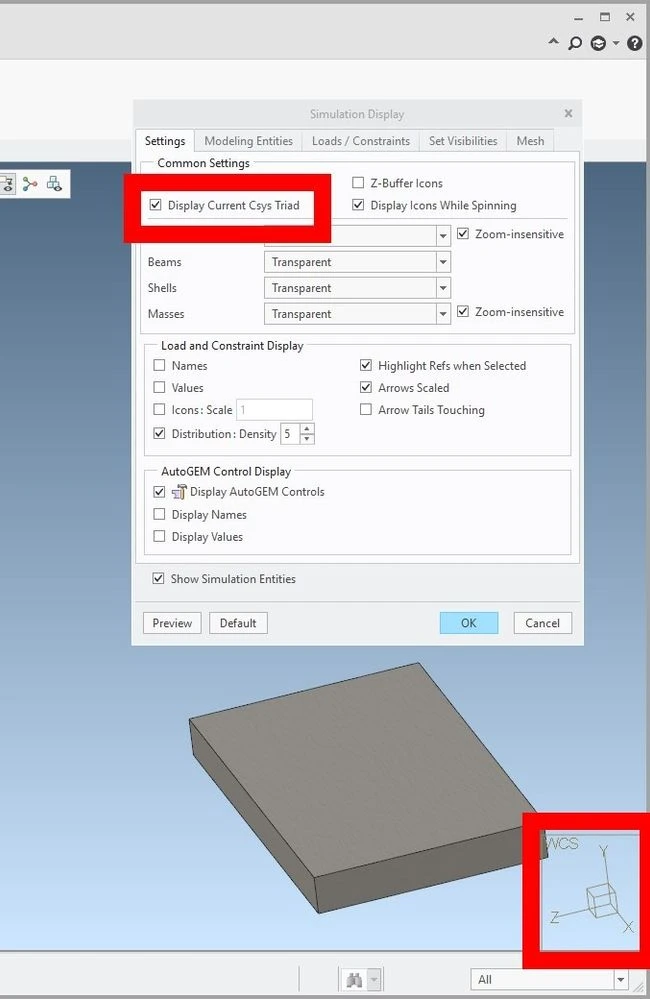
Display_WCS_CSYS_Allways.jpg

7 replies

Mar 4, 2019 9:29 AM UTC
I would agree with this proposal but some additional info needs to be added here. First, it needs to be an option. So it can be enabled or disabled. Second, the cso symbol should have the same color code as the normal cso (red, blue, green) then it would be beneficial if the cso could function as a view orientation as well. Like in other CAD systems. If you click on the z-axis this will be oriented normal to your screen. I have a picture of such a cso but the system does not allow me to attach it to this mail. 😞
Mar 12, 2019 7:27 AM UTC

Great idea! And please add: If you klick on an axis, for example X, then the model is turned and shown in plane Y,Z direction on the screen.

Mar 29, 2019 11:25 PM UTC
Status changed to: Acknowledged
Apr 26, 2019 2:04 PM UTC

This would be a good way to meet ASME Y14.41 for model based definition, section 5.1.3, requiring a right handed coordinate system be displayed.  One in the model is fine, but I think this would be better.

Aug 19, 2020 2:21 PM UTC
Status changed to: Under Consideration

This enhancement is part of our overall UI modernization project for Creo.  In the past number of releases, we have made great strides to improve the UI in Creo, whether it is related to Dashboard, Model Tree, etc.  This is an area we will continue to improve from release to release.  On our roadmap for UI modernization, we have plans to include such a triad/orientation tool, based on the global coordinate system to improve overall usability.  


Regards,

Mark Fischer

Sr. Director, CAD Product Management

Mar 29, 2021 8:59 AM UTC

HI. Has this been implemented yet or when/ which version will it be implemented? I think it would also be good to be able to configure it to follow a user defined coordinate system, since there may be many csys in an assembly and the reference coordinate system may not have been defined at the startup of a CAD exercise.

Dec 15, 2025 11:07 PM UTC

@mfischer  "This enhancement is part of our overall UI modernization project for Creo.  In the past number of releases, we have made great strides to improve the UI in Creo, whether it is related to Dashboard, Model Tree, etc.  This is an area we will continue to improve from release to release.  On our roadmap for UI modernization, we have plans to include such a triad/orientation tool, based on the global coordinate system to improve overall usability. "


I also think this "Current World Coordsys" could and should be used for view orientation with an onscreen axis selection to orient normal to said axis, but also this "world coordsys" should be be able to be user specified, not necessarily the implicit "Default Coordsys" origin and orientation. This might be configured on the "File -> Prepare -> Model Properties" with an option to specify the active World Coordinate System axis (name of feature ID). And this Coordinate System could be associated with a "View Cube" to specify the default 6 orthogonal views, plus the 8 isometric views.


On the screen, this Coordinate system should be displayed only to show orientation, not origin, to avoid having it displaced out of view depending on Zoom Level, or hidden inside the solid part. But axis could be clicked and picked to specify orientation (For the draft feature, or draft analysis, hole orientation, for instance).