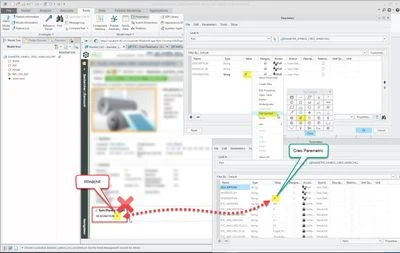
Since PTC knows about the Unicode differences, why can’t they just map it? Both tools have these characters in their symbol list. It should be easy to say “if character X in Creo 3 byte Unicode, then it will be character Y in Windchill 2 byte Unicode”! There is no way for a whole organization to know/remember to not use these characters. There is no way to properly manage this gap. We are ending up with incorrect characters in our PLM system that is then going to go to our ERP!
Here are some of the comments I provided to the product managers last year about this issue:
-----------------------------------------------
There seems to be (at least) three different ways to show something that looks like a diameter symbol in Creo:
Manually entering the Latin ‘O’ with stroke’. (Copied from Windows Char Map, etc.)
Using the Text Symbol Palette (accessible when editing parameters) or thread note symbol tokens (<ctrl-a>n<ctrl-b> in .hol files)
Using the TrueType font palette (displayed on the ‘Format’ tab when editing text/dimensions
Only methods 1 and 2 will appear ‘thicker’ since they are both TrueType fonts. Method 3 is using the special, internal Creo symbol font and this prints ‘thin’, isn’t readable outside Creo, and looks odd when everything else is displayed thicker in TrueType.
All three of these methods can be used simultaneously inside a string parameter.
Creo parameters dialog:
Creo embedded workspace:
Windchill after checking in:
Personally I like the look of the ‘real’ Unicode diameter symbol (method # 2) the best when inside Creo, but I don’t like how it’s displayed shorter when outside Creo. It’s almost like Creo is cheating and showing this character taller than it actually is. Evidence of this can be seen by putting these same three characters in other software.
Notepad:
Microsoft Word:
I also don’t like that this symbol doesn’t display at all in Notepad++
Notepad++:
What’s best? I have no idea, but whatever the solution, the symbol(s) should appear the same in Creo, in text files generated by Creo, in PDFs created by Creo, in plot (.plt) files created by Creo, and in Windchill.
Windchill Satisfaction Survey
Help shape the future of Windchill. Take our 5-minute survey and share your feedback.