
Jan 9, 2024 3:08 PM UTC
Current Functionality

Make angle between in axis pattern equally spaced along 360deg by default.

Related products:Creo Parametric

Please include detailed documentation such as screenshots, images or video.
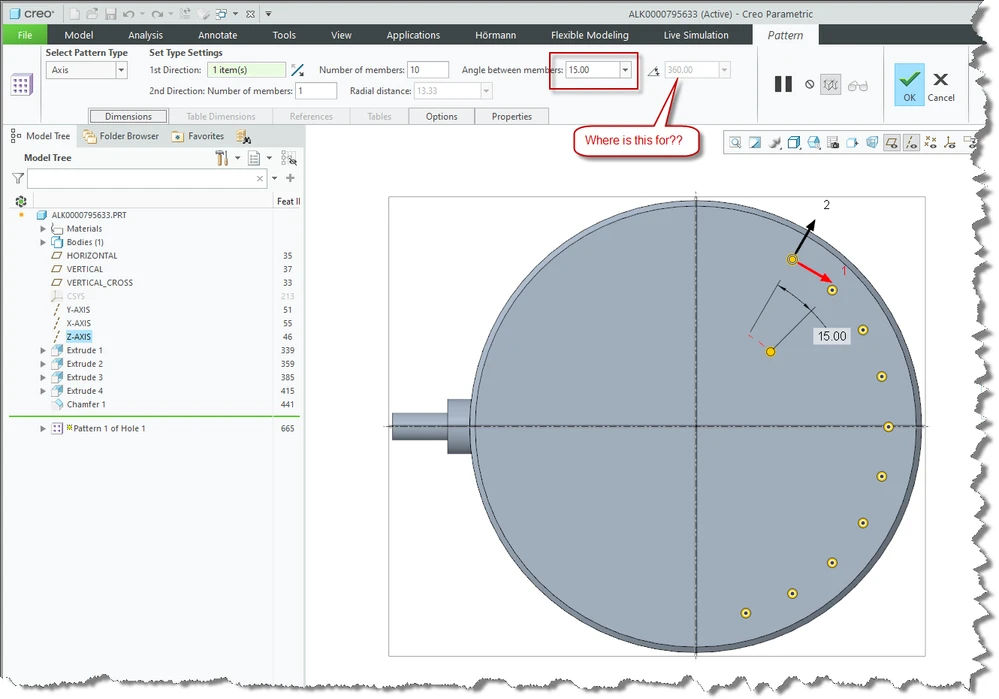
Creo pattern equally spaced along 360deg.png


1. What product and version are you running?
Creo Parametric 7.0.9.0


2. What is the problem?
When creating a pattern along an axis there is a "Number of members" and a "Angle between members". In almost all cases you want to space the number of members equally along 360 degrees. But this angle between needs to be manually "calculated". So if you have 3 members you need to fill in 120 degrees for the angle between. 

The solution would be to set the full 360 degrees as default. There is a 360 degrees field but it is grayed out, it's not clear why it's there and what's the use of it.
Also it is possible that holes are overlapping, when you use 6 members and 120 degrees as angle between.


3. Are you using a workaround? If yes, please describe it.
Do the math yourself.

4. What is the use case for your organization? Describe how your idea would work in context or how it would apply to a practical situation.
Work smarter not harder.

5. What impact does this problem currently have on your organization? (Number of users affected, hours of lost productivity, etc.)
Work smarter not harder.

9 replies

Jan 9, 2024 3:17 PM UTC

This is the button to activate the equally spaced holes.


StephenW_0-1704813448019.png


RobertHAuthor
Jan 9, 2024 3:34 PM UTC

@StephenW 😲 15 years experience with Creo but I've never noticed this is a button...... Is it me or should then this needs to be improved to make it more visible that this is a button?

Jan 9, 2024 3:35 PM UTC
Status changed to: Acknowledged

Hi @RobertH!

Thank you for your idea. Based on the information you provided, we are acknowledging it as the Community management team. This is not a commitment from the Product team. Other users may comment and vote your idea up.

Jan 9, 2024 3:55 PM UTC

I was trying to find a product idea for the color scheme and not being able to tell that it is an icon. I know it's out there!!! Somewhere!!! But I completely agree it is not obvious.


RobertHAuthor
Jan 9, 2024 4:07 PM UTC

@achirila , can you please disable this automatically generated responses? It gives zero info and adds nothing to the conversation.

Jan 9, 2024 4:21 PM UTC

It is a standard answer to ALL Ideas entered into the system. It does only acknowledge that the idea has been created and PTC is aware of it. If there is no action taken after a period of time, the idea may be archived. PTC has NEVER committed to implement any ideas that are presented in the community. They may look at an idea and IF they are going to do something about, a product manager may indicate that the idea is being considered. There have been times when PTC has said the idea is already implemented and close the idea from further comment.

As your request is stated, I think PTC may do that to this idea as the ability to generate a circular hole pattern without manually calculating the degrees between holes is implemented as @StephenW has stated. I do agree that the documentation on this feature is not well known and the training classes do not cover this feature of patterns.

RobertHAuthor
Jan 9, 2024 4:38 PM UTC

I've asked 10 frequent users of Creo and none was aware that this was a button...

Room for improvement given for free is something PTC should use, but as you say there is no willingness and they prefer to bloat about new modules nobody is going to use... But still I try from time to time...

Jan 9, 2024 5:31 PM UTC

I've actually already requested this one to be marked as "current functionality" via notify moderator

You are more than welcome to make another idea for the color scheme improvement. I'll vote for it even though I hold out no hope for implementation!

AndrewK
Community Manager
Jan 9, 2024 6:11 PM UTC
Status changed to: Current Functionality

Thanks @StephenW!