
Jan 9, 2024 1:05 PM UTC
Acknowledged

Lock in all cases a dimension if a value is entered

Related products:Creo Parametric

Please include detailed documentation such as screenshots, images or video.

When you double click the weak dimension below and type in 5 and press enter, the dimension is still weak.
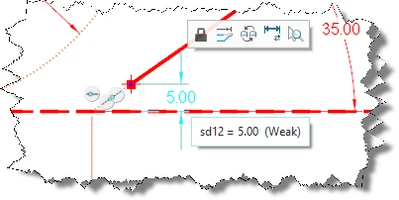
Creo lock dimension.png
1. What product and version are you running?
Creo Parametric 7.0.9.0


2. What is the problem?
If a dimension is weak but already on the desired value, the intuitive tendency then is to enter the value. But what then happens is... nothing. You have to click on "toggle lock" and THEN enter the value.

3. Are you using a workaround? If yes, please describe it.
Enter the value, find out the dimension is not locked, click on "toggle lock", enter the value AGAIN and then it it locked.

4. What is the use case for your organization? Describe how your idea would work in context or how it would apply to a practical situation.
Easy fix to speedup the work process.

5. What impact does this problem currently have on your organization? (Number of users affected, hours of lost productivity, etc.)
When small improvements are made I save time by creating new ideas on this community.

6 replies

Jan 9, 2024 1:47 PM UTC
Status changed to: Acknowledged

Hi @RobertH!

Thank you for your idea. Based on the information you provided, we are acknowledging it as the Community management team. This is not a commitment from the Product team. Other users may comment and vote your idea up.

Jan 9, 2024 2:47 PM UTC

Why are you locking the design values with weak dimensions?

Fix your dimensions before locking them.

RobertHAuthor
Jan 9, 2024 3:30 PM UTC

@BenLoosli , That's exactly what I'm trying to accomplish... I'm trying to lock the weak dimensions so the design is fixed...

Jan 9, 2024 3:43 PM UTC

Locking a dimension isn't doing what you think it is!

Locking a sketch dimension prevents it from being modified by a change to the solid model dimensions.


About Locked and Unlocked Dimensions (ptc.com)


RobertHAuthor
Jan 9, 2024 4:30 PM UTC

The option sketcher_dimension_autolock  is on yes for ages so I was indeed not aware that a strong dimension is not the same as a locked dimension. So using the "Toggle lock" button is indeed a misuse in this situation but the end result is the same when the sketcher_dimension_autolock is on yes.

  • Entering 5 on a weak dimension that is 5 doesn't make it strong and therefore it isn't locked. 
  • Entering 6 on a weak dimension that is 5 makes it strong and if the option sketcher_dimension_autolock is on yes it also makes it locked.
  • Click on the lock icon on a weak dimension that is 5 and entering 5 makes it locked and strong.

So still in my opinion the best solution would be that if a value is entered in a weak dimension it is always converted to a strong dimension, also if the entered value is the same value as the weak dimension already was.

Feb 19, 2025 11:13 AM UTC