
Jul 2, 2021 5:26 AM UTC
Archived

Lock copied & pasted sketch so it acts as a block

Related products:Creo Parametric

It would be useful to be able to move a copied sketch around as if it was a single block.


Currently when you paste a sketch you are given an opportunity to move it as a block, and then future moves run the risk of deforming it if you aren't very attentive.


See below for an example of this issue. I would like to be able to dimension it from other entities without changing the existing point relations.
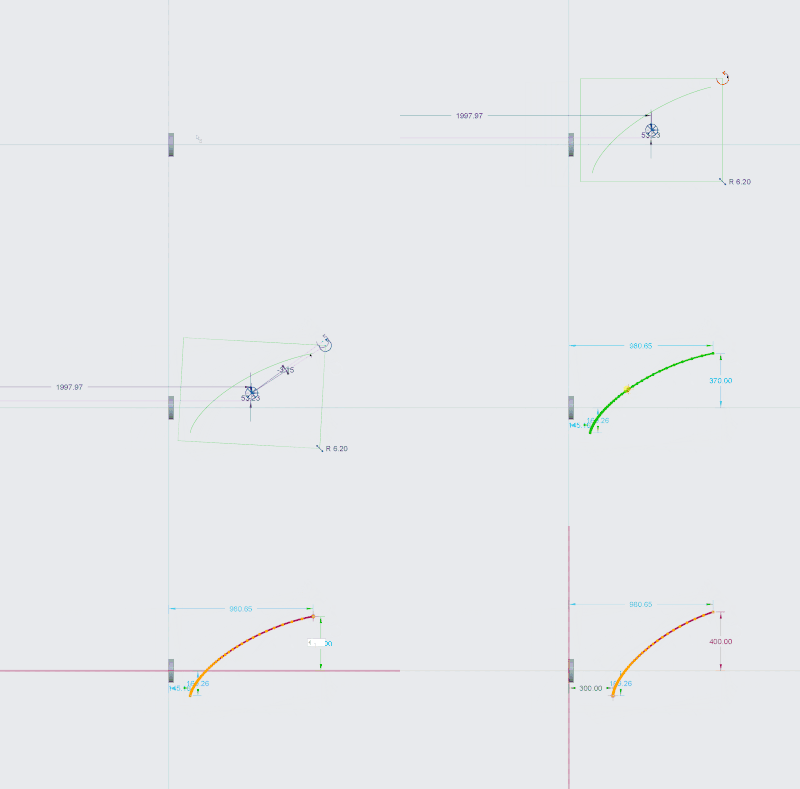
 

Animation.gif

6 replies

Jul 2, 2021 11:13 AM UTC

If reselect your sketched items, then use the "rotate resize" command, it gets you back to the move/rotate/scale option.

I'm in Creo 4

StephenWilliams_0-1625224367047.png


Community Manager
Feb 20, 2025 11:31 AM UTC
Status changed to: Clarification Needed

Thank you @CW_9587574 for publishing your idea and @StephenW for supporting it. However, we need more information as specified in the questions below. You may simply add a comment to your idea. The more details and context you give to document your idea, the better. Think about ways to educate and convince other Community members to support your idea and present your case to the product management team for consideration.


Commenters, please feel free to offer clarifications as well.

Please let us know within the next three weeks.

1. What version of the software are you running?.
2. What is the problem?
3. Are you using a workaround? If yes, please describe it.
4. What is the use case for your organization? Describe how your idea would work in context or how it would apply to a practical situation.
5. What impact does this problem currently have on your organization? (Number of users affected, hours of lost productivity, etc.)

Additionally, I invite you to check out this topic where PTC executives explain product managers' approach to customer ideas and input for product roadmaps.

Please see examples of well-documented ideas:

https://community.ptc.com/t5/Creo-Parametric-Ideas/Make-Shrinkwrap-quality-more-scalable-to-data-size-complexity/idi-p/810192 

https://community.ptc.com/t5/Creo-Parametric-Ideas/Option-to-Import-STEP-file-as-Inseparable-Assembly-by-Default/idi-p/812924 

https://community.ptc.com/t5/Creo-Parametric-Ideas/Eztol-Rename-action-not-synchronous-in-Eztol/idi-p/828000 

https://community.ptc.com/t5/Creo-Parametric-Ideas/Always-enable-ability-to-Add-View-Label-in-a-drawing/idi-p/837630 

Feature parameters can be input and changed togeth... - PTC Community 

Feb 20, 2025 12:46 PM UTC

My opinion, this functionaility exists.


move-rotate.gif

Feb 27, 2025 4:34 PM UTC

The use case I would see for this is for imported sketches (ex: company logos). It would be helpful to treat the entire sketch as a grouped block which could provide the following benefits:

  • Not having to display 100's or 1000's of constraints/dimensions which can slow Creo down.
  • Prevent accidental modification of part of the sketch/logo.
  • Easy to constrain the blocked sketch to other sketch references. This allows for better sizing/placement on references and things like having the blocked sketch automatically grow/shrink as the 3D part changes.

Our current workaround (2nd image below): Resize a DWG in AutoCAD, create IGS files of the sketches with the correct XYZ, create an import geometry feature in the 3D model, and then use the sketch>project command. Creo seems to handle this workaround significantly better. It would be nice to do this all using the Sketch Import command.


Here's an example of a complex logo using 2 different methods:

lhoogeveen_0-1740673974159.png

lhoogeveen_1-1740674005947.png


Community Manager
Mar 14, 2025 3:29 PM UTC
Status changed to: Acknowledged

Based on the information provided, we are acknowledging it as the Community management team. This is not a commitment from the Product team. Other users may comment and vote your idea up.

olivierlp
Community Manager
Oct 8, 2025 3:07 PM UTC
Status changed to: Archived

Hello,

We are archiving your idea as part of a general review. This action is based on the age of your idea and the total number of votes received, as per this announcement.

You can always post a new idea with all the details required in the form.

Thank you for your participation.

Olivier