
Keep Creo Elements/Pro responsive when "Show Model Annotiations" for all datum features is selected on a comprehensive drawing view
Symptoms
Creo Elements/Pro does not respond for 20 min or longer if "Show Model Annotiations" and a comprehensive drawing view is selected. In previous versions (e.g. Pro/ENGINEER Wildfire 3/4) is was not as easy as in Creo Elements/Pro and the following versions to run into this situation.
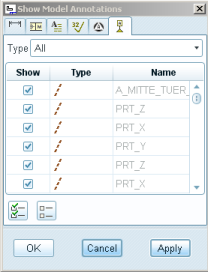
Figure 1: "Show Model Annotations" dialogue with "Axes" selected.

Figure 2: Detail of a drawing view: After 20 min all axes have been shown, meanwhile Creo Elements/Pro does not respond.
Steps to Reproduce
- Open Drawing with a comprehensive drawing view
- Open "Show Model Annotiations" dialogue box
- Select a view that contains a huge number of model axes
- Select Type Axes in "Show Model Annotiations" dialogue, if not already selected
- Creo Elements/Pro does not respond for 20 min and longer
How to keep Creo Elements/Pro responsive?
Idea A
Update 2015-03-05: Implemented since Creo Elements/Pro M230, see Improve performance showing axes on large drawings by showing only the axes of the top model
The implementation could be improved by adding a checkbox to the "Show Model Annotations" diaolg that makes the behaviour directly configurable in the UI (see note of Domingo Hermosillo 04.03.2015 22:06)
Implement a config.pro option "show_Annotations_axes_for_views" which changes the behaviour in "Show Model Annotations" dialogue when selecting an drawing view and the axes tab within the "Show Model Annotations" dialogue is active (or activated). This option has two values:
- show_Annotations_axes_for_views all_models_in_view*
This is the current default behaviour and default value. If a view is selected in "Show Model Annotations" dialogue and the axes tab within the dialogue is active all axes of all shown models in the selected view are shown. This will lead Creo Elements/Pro to become unresonsible if the view contains more than just a few models. - show_Annotations_axes_for_views referenced_basic_model_only
This option is the new behaviour. If a view is selected in "Show Model Annotations" dialogue and the axes tab within the dialogue is active only the axes of the referenced model of the view will be shown. This is the same behaviour like the dimensions tab in "Show Model Annotations" dialogue works. It leads to constistent user experience in the "Show Model Annotations" dialogue and Creo Elements/Pro will not become unresponsible for views which contain more than a few models.
It might be a good idea to even change the default value/behaviour to "referenced_basic_model_only".
Idea B
Implement a stop button, to cancel that action if Creo Elements/Pro does not respond in that situation. Try to use the existing stop button which can be used e.g. during model retrieval.
Update 2015-03-05: This could solve not responding sessions when using the default setting of the new config option show_axes_by_view_scope.