
Aug 6, 2024 1:39 PM UTC
Acknowledged

Individual dual dimensioning instead of applying it globally

Related products:Creo Parametric

1. Describe the Problem

Can't dual dimension individually.
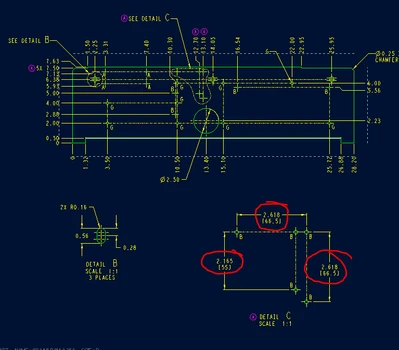
MV_9750226_0-1722950984119.png


2. Are you using a workaround?
Yes, by adding text to dimension to represent the secondary dimension.

3. What is the use case for your organization?
It would allow a dimension to be dual dimensioned individually instead of globally

4. What impact does this problem currently have on your organization?
It affects all of our Design Engineers within Carrier that need to add dual dimensions to individual dimensions.

8 replies

MV_OnionAuthor
Aug 6, 2024 1:41 PM UTC

Want the ability to Individual dual dimension instead of applying it globally.

Community Manager
Aug 6, 2024 2:14 PM UTC
Status changed to: Clarification Needed

Thank you @MV_Onion for publishing your idea. However, we need more information as specified in the form you saw in the submission process. (questions below). You may simply add a comment to your idea. The more details and context you give to document your idea, the better. Think about ways to educate and convince other Community members to support your idea and present your case to the product management team for consideration.

Please let us know within the next two weeks.

Additionally, I invite you to check out this topic where PTC executives explain product managers' approach to customer ideas and input for product roadmaps.

Aug 7, 2024 11:35 AM UTC

@Catalina , this idea is appropriately documented. Please acknowledge.

MV_OnionAuthor
Aug 7, 2024 11:52 AM UTC

@Catalina. Please specify what clarification you want? The information I provided was very specific to how PTC could improve dual dimensioning within Creo. My submission was an idea to improve Creo and was submitted per the instructions on PTC's website.

Community Manager
Aug 7, 2024 12:10 PM UTC
Status changed to: Acknowledged

Hi @StephenW,


Thanks a lot for chiming in on this one, appreciate the heads up!


Hi @MV_Onion,


Thank you for pointing this out!


As Community Moderators, we are usually looking for very detailed and documented explanations for ideas that are posted. We do look out for the content to be as fruitful as possible, of course, and usually we recommend that it is written in such a manner that you'd have to basically present to other people, specifically the Project managers which further check these ideas out.


Of course, at the end of the day, it is nice to have people such as Stephen, who is also part of our Champion program, to chime in and notify us like he did. We understand that sometimes ideas like yours are pretty straightforward and don't need much explaining to do. 


That being said, thank you both for your participation in this and we are acknowledging the idea as the Community management team. This is not a commitment from the Product team. Other users may comment and vote your idea up.


Thank you!

Aug 7, 2024 12:18 PM UTC

Currently, the only option for dual dimensioning is to use the drawing setup file option dual_dimensioning. This applies dual dimensions on all dimensions on a drawing. Occassionally, especially when working with parts with units other than "normal", it is convenient to dual dimension a specific area that interfaces with a component and "show" original units as a check. 


Aug 7, 2024 2:15 PM UTC

To piggy back on what @StephenW said ... sometimes we have key characteristics that need to be verified with one set of units but the rest of the part doesn't need all of the dimensions checked in that unit set. Having all of the dimensions be dual dimensions leads to a crowded drawing.

Mar 13, 2025 3:30 PM UTC

And the workaround, of adding text to the callout, is a recipe for disaster when changes get made to subsequent revisions. Your linked value and text value would no longer match.

So a dimension of 1.000 [25.4] could be changed to 1.250, but the callout on the drawing would be 1.250 [25.4] until someone goes in and manually enters the correct dual-dim value.