Sep 5, 2025 6:21 AM UTC
Archived

in SOLIDIFY feature add ability to keep reference quilt

Related products:Creo Parametric

1. Describe the Problem

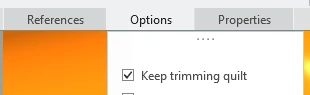
as in trim feature here in SOLIDIFY feature it will be great to have also the same option to choose if we want or not to keep reference surface:
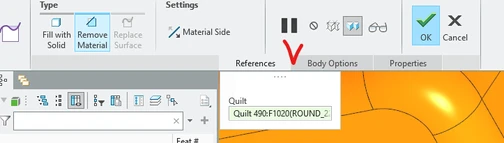
rsobecki_0-1757053172814.png

can be like in trim

rsobecki_1-1757053210841.png


2. Are you using a workaround?
manually copy reference surface before the solidify feature

3. What is the use case for your organization?
low

4. What impact does this problem currently have on your organization?
none


Status changed to: Archived 2026-07-06

We are archiving this idea as part of a general review. This action is based on the age of your idea and the total number of votes received, as per this announcement.

You can always post a new idea with all the details required in the form.

Thank you for your participation.

This topic has been closed for replies.

2 replies

Community Manager
Sep 5, 2025 11:17 AM UTC
Status changed to: Acknowledged

Thank you @rsobecki for your idea. Based on the information you provided, we are acknowledging it as the Community management team. This is not a commitment from the Product team. Other users may comment and vote your idea up.

Sep 5, 2025 5:14 PM UTC

I agree, since I think it's not something too complicated to implement.

And also for consistency purposes, when doing a "Replace Surface" option instead of a "Fill with Solid" or "Remove Material", give the other option of removing or consuming the quilt.


Currently we have to waste time creating a layer to hide it, or use the Remove surface command and select the quilt and click on the "Leave Open" option to simply delete the quilt.