Sep 5, 2025 6:42 AM UTC
Archived

in copy feature be able to copy whatever user want e.g. many not connected quilts

Related products:Creo Parametric

1. Describe the Problem

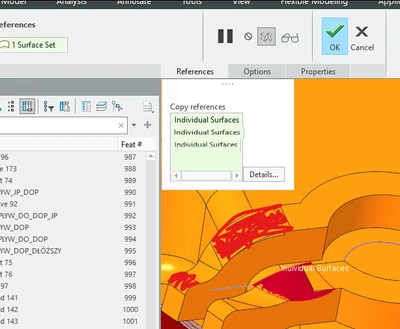
at the moment user must create many separate features if want to select more disconnected references:
rsobecki_0-1757054017985.png

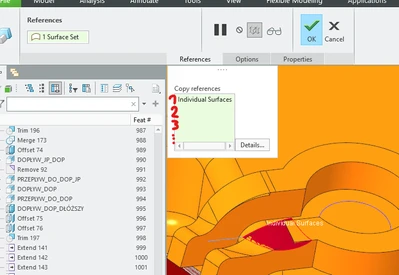
it can work like this example:

rsobecki_1-1757054197314.png


and some references user can pick can be different quilts or even surfaces from current geometry as it is at the moment when on existing geometry we can select whathever want:
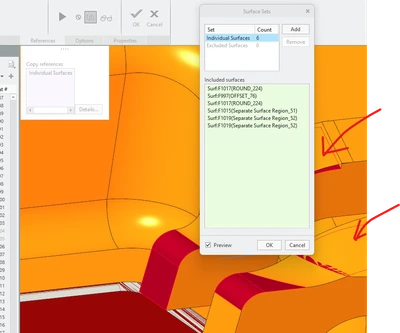
rsobecki_2-1757054421727.png

in upper example in details several references are visible, but adding additional quilts outside the geometry is not possible


2. Are you using a workaround?
manualy copy several separate copies

3. What is the use case for your organization?
only designers time consuming

4. What impact does this problem currently have on your organization?
low


Status changed to: Archived 2026-07-06

We are archiving this idea as part of a general review. This action is based on the age of your idea and the total number of votes received, as per this announcement.

You can always post a new idea with all the details required in the form.

Thank you for your participation.

This topic has been closed for replies.

6 replies

Community Manager
Sep 5, 2025 11:18 AM UTC
Status changed to: Acknowledged

Thank you @rsobecki for your idea. Based on the information you provided, we are acknowledging it as the Community management team. This is not a commitment from the Product team. Other users may comment and vote your idea up.

rsobeckiAuthor
Sep 5, 2025 2:58 PM UTC

Hi Catalina!

Do You know how to list of ideas and select the author, me for example?

Thanks In advance and have a great weekend!

Pozdrawiam / Best regards

Roman Sobecki
Dział Projektów / Design Department
mobile: +48 505 54 90 47
e-mail: rs@reend.eu /
design@reend.eu
__________________________________________

upload_-aW1hZ2UwMDEucG5n-6105164096216317059..png

REEND Sp. z o.o.
ul. Dworcowa 152 | 64-120 Krzemieniewo | Poland

**bleep** 6972311452 | KRS 0000499879
Kapitał zakładowy 6 000 000 PLN
tel. +48 65 536 10 00, fax +48 65 536 10 45
www.reend.eu

Sep 5, 2025 8:03 PM UTC

Also there should be a command that let the users "Join" or "Merge" quilts even when they do not intersect to be able to select those disjoint closed quils for features thar allow only a single quilt reference.


Currently we have to make a workaround of creating geometry to connect those disjoint quilts to make a single one, and then try to remove the connecting extra geometry.


The converse is also true, sometimes we have a single quilt with disjoined sub-quilts, and we might want to use only one of them as a quilt for solidifying or whatever. Currently the only way to separate disjoint quilts is to copy the geometry of one of the sub-quilts to use it for later operations.


It could work similar to the "Split" body by volume, but for quilts. And for bodies, we can "join" bodies that do not intersect, but we cannot do the same for quilts. This is inconsistent and forces the user to make several workarounds.


I also think that on the model tree on the design items, disjoint quilts or bodies should be shown as sub-nodes of the respective body or quilt. And let Creo be aware of this composite nature of bodies or quilts, and using query select to pick a sub-body or sub-quilt, or picking directly on the model tree, let the users select one of seevral disjoined quilts or bodies.


For the joining of quilts, to avoid having to create another command, I think the current "Merge" command could be used, with a checkbox to allow merging disjoined (non intersecting) quilts. And have a "Split" quilt command to replicate the same operation that existis for bodies.


Congratulations to @rsobecki for these ideas to try to improve the efficiency of the user.  We know that are workarounds, but make the user waste additional time.

Community Manager
Sep 8, 2025 6:29 AM UTC

Hello @rsobecki,


To retrieve a list, you can do the following:

On the Community, click on the search button at the top and the search bar will open. Click again on the now green search button:

Catalina_0-1757312630620.png

Then, a filtering page will appear like this:

Catalina_1-1757312694328.png

Use the filters at the top to guide your search. on author, put your username, and on type of posts, check ideas. You should receive this outcome:

Catalina_2-1757312810494.png

You can further use the other filters if you wanted a more targeted search.


Hope this helps.


Best regards,

Catalina 


rsobeckiAuthor
Sep 8, 2025 6:37 AM UTC

thanks Catalina it helps 😉

rsobecki_0-1757313433714.png


Community Manager
Sep 8, 2025 6:41 AM UTC

No problem! I'm glad it does.