
Sep 25, 2019 8:57 AM UTC
Acknowledged

Improved arrow direction toward center axis when creating hole annotations

Related products:Creo Parametric


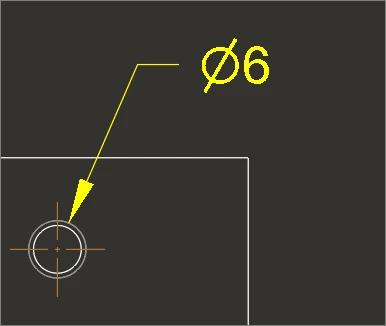
If you use the Holes feature to create annotations after creating a hole, the arrow does not point toward the hole center. When measuring the diameter, the arrow points to the hole center. The user tries to use the drawing annotation by modifying the holetable, but the arrow direction is not centered, making it difficult to use.
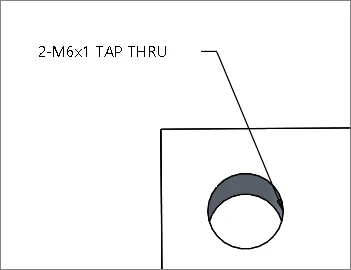
 

이미지 12.png


중앙지름.png


(The direction of the arrow measuring the diameter is toward the hole center.)

5 replies

Sep 25, 2019 12:58 PM UTC

Is that tapped hole 'dimension' a real dimension or a text string, like a note?

If it is a note, then it will not point to the center, unless you select the center as the leader attachment point.

I know some of this is automated by PTC programmers, who usually have no real world design/drafting experience, they are computer science majors.


Community Manager
Feb 12, 2025 10:35 AM UTC
Status changed to: Clarification Needed

Thank you @spark-9 for publishing your idea. However, we need more information as specified in the questions below. You may simply add a comment to your idea. The more details and context you give to document your idea, the better. Think about ways to educate and convince other Community members to support your idea and present your case to the product management team for consideration.

Please let us know within the next three weeks.

1. What version of the software are you running?.
2. What is the problem?
3. Are you using a workaround? If yes, please describe it.
4. What is the use case for your organization? Describe how your idea would work in context or how it would apply to a practical situation.
5. What impact does this problem currently have on your organization? (Number of users affected, hours of lost productivity, etc.)

Additionally, I invite you to check out this topic where PTC executives explain product managers' approach to customer ideas and input for product roadmaps.

Please see examples of well-documented ideas:

https://community.ptc.com/t5/Creo-Parametric-Ideas/Make-Shrinkwrap-quality-more-scalable-to-data-size-complexity/idi-p/810192 

https://community.ptc.com/t5/Creo-Parametric-Ideas/Option-to-Import-STEP-file-as-Inseparable-Assembly-by-Default/idi-p/812924 

https://community.ptc.com/t5/Creo-Parametric-Ideas/Eztol-Rename-action-not-synchronous-in-Eztol/idi-p/828000 

https://community.ptc.com/t5/Creo-Parametric-Ideas/Always-enable-ability-to-Add-View-Label-in-a-drawing/idi-p/837630 

Feature parameters can be input and changed togeth... - PTC Community 

Feb 25, 2025 1:25 PM UTC

1. Creo 8

2. For a standard hole diameter dimension, when moving the dimension , the leader always points towards the center of the hole. This has always been standard drafting practice. In Creo, when a hole note is shown (ptc standard model annotation, OOTB), the note is a not a dimension, it is a note with a leader, when the note is moved, the leader does not follow the hole centerline.

3. The only work-around is to use a dimension and re-create the hole note within the dimension, thus defeating the purpose of the automatically created hole note.

4. The use case is to utilize PTC provided hole note that comply with long standing standards. 

5. Not following typical drafting standards may create confusion in downstream users of the drawing which may lead to manufacturing errors.

Feb 25, 2025 6:00 PM UTC

Exactly what Stephen said above!

Community Manager
Feb 26, 2025 2:31 PM UTC
Status changed to: Acknowledged

Based on the information provided, we are acknowledging it as the Community management team. This is not a commitment from the Product team. Other users may comment and vote your idea up.