
Apr 27, 2022 2:29 PM UTC
Delivered

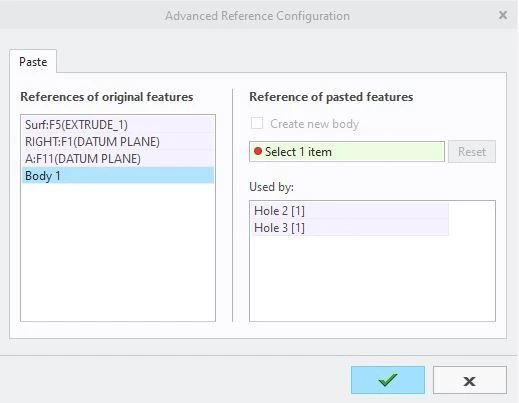
If only 1 body exists, the advanced reference configuration should just automatically pick that body

Related products:Creo Parametric

1. Describe your environment: What is your industry? What is your role in your organization? Describe your stakeholders.
Aerospace, CAD user, CAD users


2. What version of Creo Parametric are you currently running?
Creo 7

3. Describe the problem you are trying to solve. Please include detailed documentation such as screenshots, images or video.

I haven't created a new UDF but I think this is a problem with new UDFs as well. When you use the paste special and the advanced reference configuration, you now have to select the body that you want the features to apply to. Most parts are only built with 1 body. If only one body exists in the part then the advanced reference configuration should just automatically select the only body that exists. The user can still have the ability to check the "create new body" checkbox if they want to create a new body. This is already the functionality UDFs created before Creo 7s release (which are still usable in Creo 7).
 

Capture.JPG


4. What is the use case for your organization?
See above. If only one body exists it is nonsensical to ask which one to pick.

5. What business value would your suggestion represent for your organization?
It would save a click.

9 replies

olivierlp
Community Manager
Apr 27, 2022 8:24 PM UTC
Status changed to: Acknowledged

Hello,
Thank you for your idea and the information provided.

Olivier
Sep 14, 2022 3:18 PM UTC

It is interesting that Creo7 clearly already knows how to do this because when you open a model the first time in Creo7 it knows how to figure out that there was only one body and to assign that to all the existing features that were created with/without UDFs.


I am curious, if normal features don't require this extra click, what is it about UDFs that mandate it?

(And no, I do not want this extra click to be done for normal features! 😱 )

Apr 12, 2023 11:13 PM UTC
You need to add the config.pro option to automatically select the first body when udf is selected.


Apr 13, 2023 10:04 PM UTC

@IS_4437507 , that would be great if completely controlled by a config.pro option.  Can you specify the exact config.pro option you are referring to?


e.g.

LawrenceS_0-1681423394639.png


Sep 20, 2023 9:59 AM UTC
Status changed to: Implementation In Progress

this is in currently planned for Creo 11.0 and we currently also plan to also backport it to MORs of Creo 9 and Creo 10

Sep 21, 2023 10:38 PM UTC

Thank you @mneumann !  This sounds promising and we will look forward to it!   Thanks for also planning on backporting this functionality! 🤞👏🎉

Apr 4, 2024 4:56 PM UTC

Please add this feature. If you are creating UDF's for 1st features. for example, a UDF of an 8020-1515 extrusion. The user is forced to make three extra picks to select the body. 1. Expand the Design Features in the model tree, Expand the Bodies in the model tree. and finally pick on the body. Personally I'd move back to Creo 4 to create the source part and UDF and then just use that in Creo 7 and later. 

Apr 18, 2024 1:35 PM UTC
Status changed to: Delivered

This is delivered in Creo 11 - see Enhancement: Streamlined Placement of Legacy UDFs (User-Defined Features) 
(and also included in 10.0.4.0 & 9.0.8.0)

Apr 29, 2024 10:08 PM UTC

This is great news, and the backporting is great so we can make use of it much sooner!  Thank you!