Apr 22, 2021 8:13 AM UTC
Acknowledged

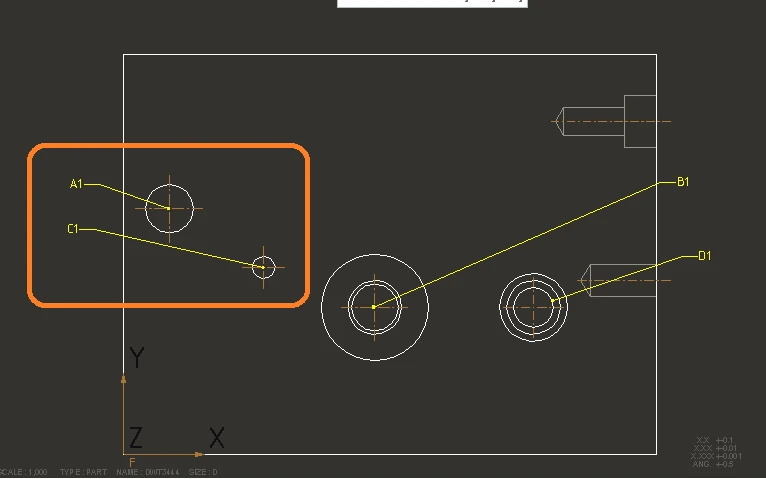
Hole Label must have Leader option to represent Holes while creating Hole Table in drawing

Related products:Creo Parametric

Hole Label must have Leader option to represent Holes while creating Hole Table in drawing. Now while creating Hole table , we have only Hole Upper right and Hole center as position for hole label. If we have more holes which are very near , it is very clumsy and it is difficult to understand the hole labels while placing the hole label as upper right or to the hole center. This Hole label for the leader origin should not be changed when we updated the hole table due to changes in 3d model. I have attached a simple dawning which shows hole label with leader to understand. We also suggest to have Save option  for the table columns. Now we have to go and add parameters manually each time.
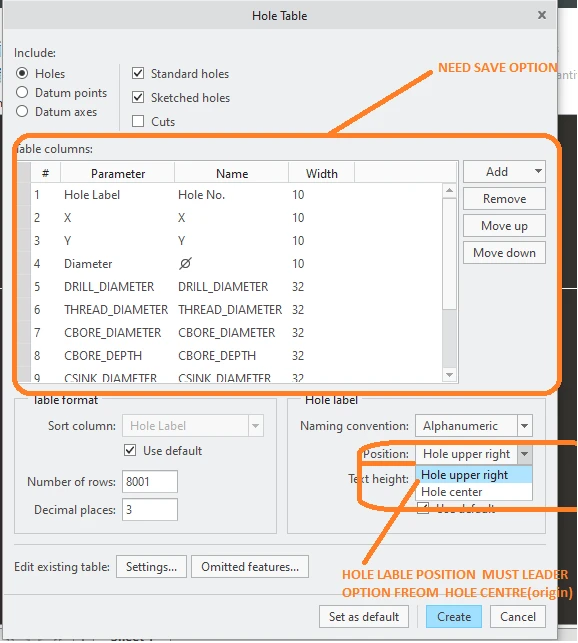
Hole_lable_with leader and save settings option.pngHole_lable_with leader.png

5 replies

Apr 23, 2021 3:46 PM UTC

I have a question for you.  Is your hole table auto populating with all those hole parameters such as the C'sink size or are you manually filling this in?  If it auto populates what version are you using?

Apr 26, 2021 3:07 PM UTC

We are using Creo6.0.5.1.It is automatically populating. I have used Standard Hole feature without tapping option

Apr 27, 2021 11:35 AM UTC

Yes that save a lot of timing.

Apr 30, 2021 4:27 AM UTC

Yes, If these options will available : to save the list of parameters & to get the leader for hole annotation.

It will easy to generate a critical hole table easily..


Dec 11, 2022 11:01 AM UTC
Status changed to: Acknowledged