
Jul 6, 2023 11:51 AM UTC
Acknowledged

Highlight Top / Side Cell Headers in Family Table

Related products:Creo Parametric

Please include detailed documentation such as screenshots, images or video.

1. What version of the software are you running?
Creo 9.0.4.0


2. What is the problem?
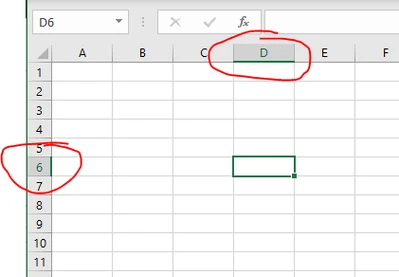
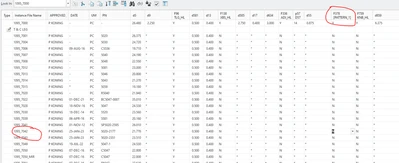
When editing large family tables you cannot easily tell with row and column you are editing. Can you add highlighted marking on the row and column headers - similar to Excel for clarity.
 

Dale_Rosema_0-1688642855797.png


Dale_Rosema_0-1688644773656.png


See how easy it is for you to tell which column and row in Excel vs a family table in Creo.


3. Are you using a workaround? If yes, please describe it.
You have to move way to the left or way to the top to figure out where you are. There is no work around to which I am aware.

4. What is the use case for your organization? Describe how your idea would work in context or how it would apply to a practical situation.
It would allow the user the ability to quick note which column and row is being edited in family tables.


5. What impact does this problem currently have on your organization? (Number of users affected, hours of lost productivity, etc.)
It would save each worker about 30 minutes to an hour each week, each person.

7 replies

Jul 6, 2023 12:20 PM UTC
Status changed to: Acknowledged

Hi @Dale_Rosema!

Thank you for your idea. Based on the information you provided, we are acknowledging it as the Community management team. This is not a commitment from the Product team. Other users may comment and vote your idea up.

Jul 26, 2023 8:41 AM UTC

Similar effects would be better.

PD776_0-1690360717134.png


Jul 26, 2023 8:56 AM UTC

Animation demonstration.


Aug 29, 2023 2:20 PM UTC

I would consider "Editing the current table using Excel" to be a workaround. You can highlight, format, freeze rows/columns in excel to stay organized when editing large family tables.

ME_CADADMIN_0-1693318768380.png


Aug 29, 2023 2:22 PM UTC

That would be good on major edits, But what about that quick edit on column 30, row 100 where you just want to change one number?

Aug 29, 2023 2:24 PM UTC

I do agree with your idea. It would make quick changes easier.

Aug 29, 2023 2:26 PM UTC

I have a lot of families where I make a new instance, copy another one and only change 1 or 2 cells.

Thanks!!