
Jun 6, 2014 7:20 AM UTC
Archived

Hide the instance name on the picture generated by save as jpg

Related products:Creo Parametric

When you save a picture from a 3D model using the save as / .jpg , if the part include a family table, the generic or instance name is include on the left at the bottom of the picture generated.

If you have a combined of: Exploded State / Style / Rep Simp / Instance .... the indications are incredibly to long on the screen.

Add an option in order to hide this text on the result file.
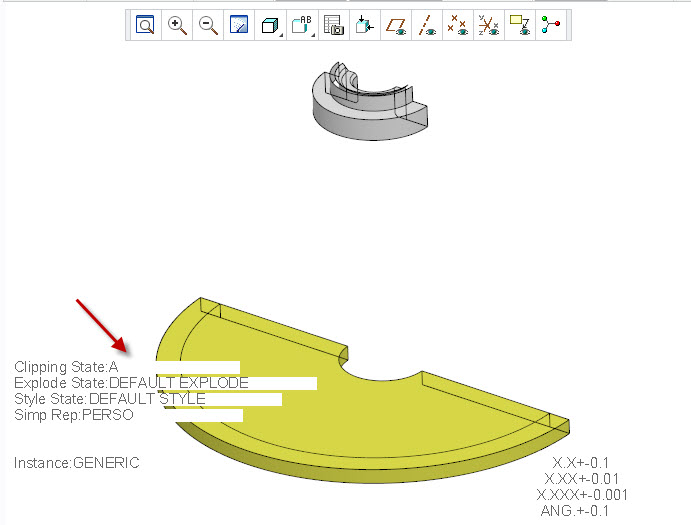
Indications.jpg

3 replies

fmarinierAuthor
Jan 13, 2015 7:19 AM UTC

We have found that the command: ~ Command `ProCmdViewShade` Allow us to temporaly Hide the indications on screen.

Why dont put by default these command when printng in Jpeg ?

Why don't add an config.pro option to hide these information if sometimes not requiered.

Thanks

Allow+to+hide+information.jpg

Jun 14, 2018 7:51 PM UTC
Status changed to: Acknowledged
olivierlp
Community Manager
Jan 4, 2022 2:03 PM UTC
Status changed to: Archived

Hello,

We are archiving your idea as part of a general review. This action is based on the age of your idea and the total number of votes received, as per this announcement.

You can always post a new idea with all the details required in the form.

Thank you for your participation.

Olivier