
Jan 31, 2024 2:54 PM UTC
Alternate Solution

Having ModelCheck to Select rather than Highlight.

Related products:Creo Parametric

Please include detailed documentation such as screenshots, images or video.

1. What product and version are you running?
Creo 10


2. What is the problem?

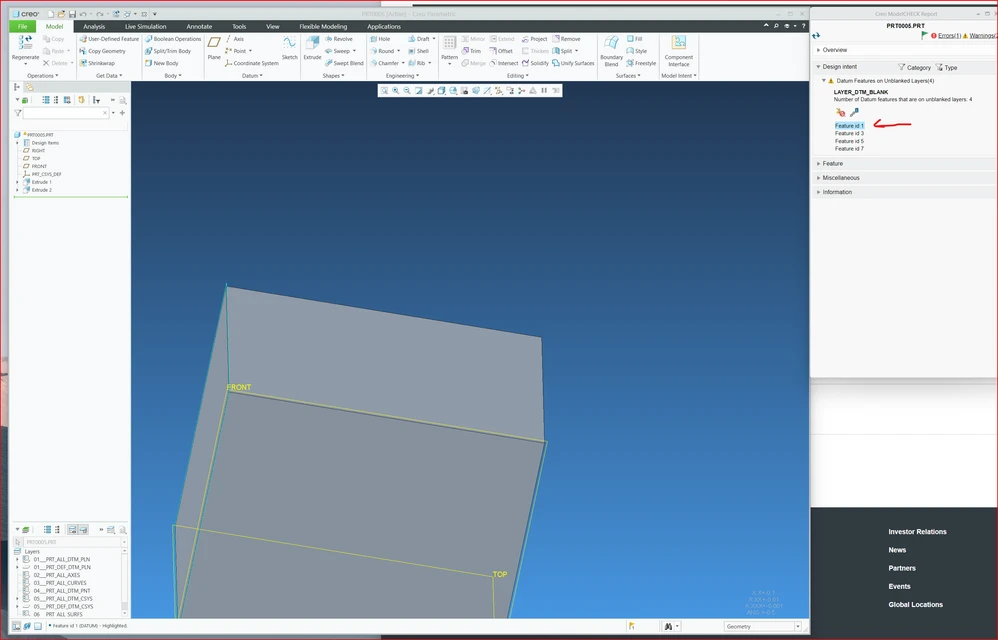
Today when selecting a feature/geometry in ModelCheck report the geometry is highlighted.
request to have the ability to change the behavior to perform "Select" ( so the feature will be selected rather than highlighted ).


3. Are you using a workaround? If yes, please describe it.
No

4. What is the use case for your organization? Describe how your idea would work in context or how it would apply to a practical situation.
today the workaround is tedious ( go to search, apply relevant search and apply the action ).

having the option to select the feature will save a lot of time and improve the usability

5. What impact does this problem currently have on your organization? (Number of users affected, hours of lost productivity, etc.)
having the option to select the feature will save a lot of time and improve the usability
MC_Highligth.png

7 replies

Jan 31, 2024 3:26 PM UTC

Great idea!! 

Jan 31, 2024 3:27 PM UTC
Status changed to: Acknowledged

Hi @Rami_Noah!

Thank you for your idea. Based on the information you provided, we are acknowledging it as the Community management team. This is not a commitment from the Product team. Other users may comment and vote your idea up.

Apr 23, 2024 3:43 PM UTC

Thank you for the idea! In Creo 11 we have updated Modelcheck to also highlight in the Model Tree. Now, when you select the part in the Modelcheck report it highlights both its place in the assembly, as well as in the Model Tree. This should improve Modelcheck usability around finding the areas that Modelcheck is calling out. 

Rami_NoahAuthor
May 6, 2024 11:36 AM UTC

Just seen it.

Thanks 👏

olivierlp
Community Manager
May 6, 2024 11:59 AM UTC
Status changed to: Delivered

Following @Irena_Roggeveen comment, I am marking this as delivered. Thanks @Rami_Noah for the idea, and all for the votes and comments! 

Olivier
Nov 12, 2024 6:21 PM UTC
Status changed to: Alternate Solution
Jan 8, 2026 3:50 PM UTC

Assuming that I understand this correctly....once you select the feature from the Modelcheck window, you can simply Right-click in the model window for available actions on that feature.