Apr 9, 2015 3:43 AM UTC
Current Functionality

Flip the direction of wires in Creo Parametric ( Cabling)

Related products:Creo Parametric

When wires/cables/network is routed through datum axis ( location points ), we need an easy way to flip the direction of wires in Creo Parametric.

History

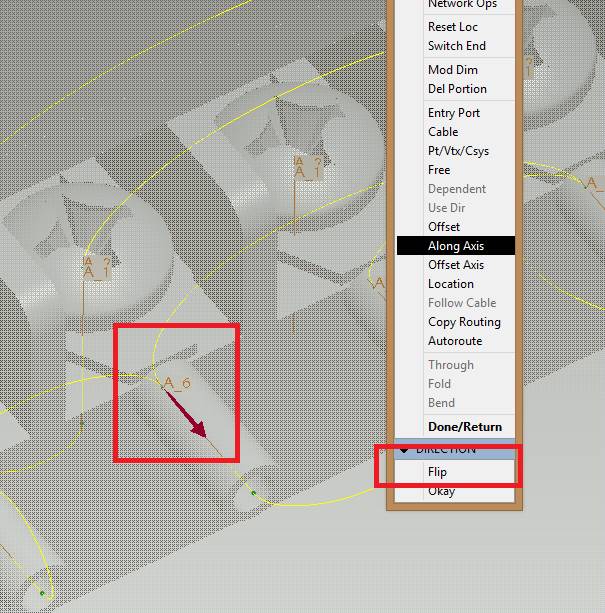
In Wildfire 4.0 there was an easy option to flip the wires. Please below.
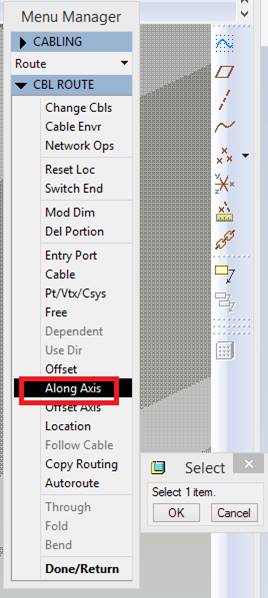
From Wildfire 5.0 on words, this functionality is missing. Users reed to add the location points and drag the wires.

12 replies

Apr 9, 2015 4:07 AM UTC

To be able to flip, now requires extra clicks and more steps. The cable has to be first created and then the location redefined.

Users working on cabling are finding this very frustrating ...... imagine creating 50 cables and then redefining the location to reverse the direction (non-productive).

Oct 19, 2016 12:48 PM UTC

This video shows how to flip prior to along axis.  The red section of the wire indicates which segment the next location will placed next, so you know when to flip direction

Video Link : 7290

Oct 19, 2016 12:50 PM UTC

This video shows how to use the undo if you do happen to go in the wrong direction

Video Link : 7293

I hope the videos help

Oct 19, 2016 10:47 PM UTC

Thanks Jim

Appreciate your help

Regards

Taju Joseph

Leap Australia

Oct 19, 2016 10:48 PM UTC

Is it a new enhancement in Creo 4.0

Regards

Taju Joseph

Oct 20, 2016 5:34 AM UTC

Hi Taju

Introduced in Creo 1

thanks, Jim

Oct 20, 2016 10:10 PM UTC

Thanks Jim

Feb 3, 2018 3:58 PM UTC

 Can the videos be re-uploaded or put somewhere else? The links don't seem to work. 

Thanks,

Brian

Feb 3, 2018 4:05 PM UTC

So many of the links to videos didn't come over correctly when the forum was moved last year.

I notified the moderator to see if these could be corrected. Check back next week to see if they magically re-appeared.


Feb 4, 2018 1:22 PM UTC

 Thanks!