
May 9, 2024 3:57 PM UTC
Acknowledged

flexibility dialog - Add-pre defined states tab

Related products:Creo Parametric

Please include detailed documentation such as screenshots, images or video.

1. What product and version are you running?
creo 8- 

2. What is the problem?

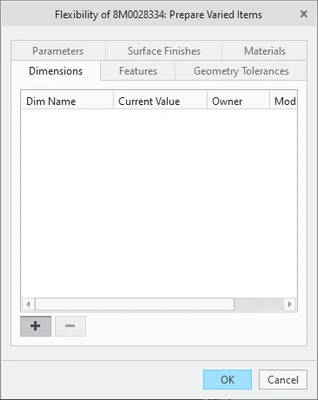
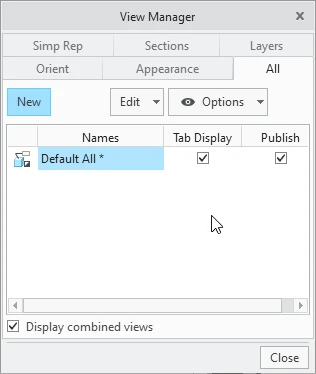
in the flexibility dialog of a Part or Assy, offer pre-defined states which change DIMS, FEATURES, PARAMETERS.. ETC similar to the VIEW MANAGER's ALL tab.
pete3000_1-1715270148990.png


pete3000_0-1715270117695.png


3. Are you using a workaround? If yes, please describe it.
setting each component's flexibility in an assy by hand..

4. What is the use case for your organization? Describe how your idea would work in context or how it would apply to a practical situation.
Components or assys in an assembly which are flexed could easily have STATES or an ALL tab with pre-defined states we can use which set parameter, dims and features all at one time.

5. What impact does this problem currently have on your organization? (Number of users affected, hours of lost productivity, etc.)
not much currently, but could easily replace family tabled items in the future where you do not want the extra instances save to the PLM system.

7 replies

May 9, 2024 7:20 PM UTC

Have tried using predefined flexibility settings to select items that need to be flexed?  This will not set the flexibility settings, but will populate the needed dimensions, parts, feature, etc. to flex.


  • To predefine flexibility in a component or assembly go to File / Prepare / Model Properties. Select “change” for Flexible under Tools section.
      • When part or assembly is assembled into an assembly you will be prompted to use predefined flexibility.
    • Select a feature or part to flex, select dimension to vary, and select OK.
    • Repeat for additional feature or part flexibilities.
    • Select OK.
  • To add flexibility when adding part with predefined flexibility.
    • Select Yes to prompt “Would you like ot use it for flexible component definition?”
    • Add new value for flexibility dimensions as needed and select OK.
May 9, 2024 8:40 PM UTC

Yes, that is where the first image above comes from [File / Prepare / Model Properties. Select “change” for Flexible under Tools section.]....  I would like the ability to pre-define multiple flexibility states using an ALL tab similar to the View Manager.  When i assemble this component and see the flexible dialog box i can choose a saved state listed there without modifying dims, features or setting parameters manually..  this ALL tab could have those settings already listed.

May 9, 2024 8:58 PM UTC

I didn't recognize the first image as the part varied items dialog.


Being able to make predefined flexibility settings could be very useful when specific variations are known.  I would also like to see the ability to add notes.

olivierlp
Community Manager
May 9, 2024 9:01 PM UTC
Status changed to: Acknowledged

Thank you @pete3000 for your idea and @kdirth for the comment. Based on the information you provided, we are acknowledging it as the Community management team. This is not a commitment from the Product team. Other users may comment and vote your idea up.

Olivier
May 13, 2024 11:44 PM UTC

@mneumueller 


I think this is a very good idea, but the proposed solution, based on tabs similar to the View Manager All states is not the right approach.


I think the best way to solve this request is to extend the concept of the parameter table to create a part or assembly "Configuration" as exists in Solidworks, NX, and other CAD packages, even for regular parts, not only for flexible parts.


The current problem with parameter tables, is that they cannot be added on the fly, these very needed and much useful tables need to be created on a Restricted Parameters text file that is only read at the start of a Creo session. This is archaic and takes too much time to create and test such tables. These tables should have an interface that should allow a quick import from a CSV or Excel file for cases when we might need to add hendreds of parameter configuration rows.


Creo should have the option to create parameter tables using an easy to use User Interface, similar to the Family Table (or even better) to allow the user for a regular (or flexible) part, to quickly choose the most suitable configuration or selection of parameter values. This table could (and should) also have the possibility to suppress or unsupress certain features, using a boolean parameter.


Using these parameter (or configuration) tables would allow more modular design inside a part, much quicker conceptual design.

Inside a part PTC should add a function similar to "LookUpInst" that exists only inside an assembly context, to be able to choose the right row of a family table instance, to allow a modular section inside a part to programtically chose the most suitable configuration table row based on user parameter selection, or based on measurements (diameter, length, distance, angles) that also exist in flexible parts.


Current implementation of Parameter Tables needs also to be updated to allow the user to filter parameter values to select the most appropriate row. Currently the only way to change the parameter table row is to change the unique "index" string that identifies each row. The row could and should be able to be filtered based on actual values that the user needs to specify, the "index" should be driven by user useful parameter selection, not the other way around.


If this request gets implemented as "Tabs" on the screen, what happens to other use cases where the user might have hundreds of possible configurations? It would be frustrating to keep scrolling the possible selection based on tabs on the screen. It's better to make the possible selection based on a pop-up table to let the user select a row, based on filtered parameter values, similar to family table instances, or let the part to be programmed with Pro/Program and let the instance selection be based on a "LookUpInstance" to search for the most adequate row or instance, based on measurements, and conditions, ie, search for exact values, or for values grater than, or less than certain measured values.


The only difference for a flexible part with a regular part, is that in the case of a flexible one, the existing user interface would let the user measure diameters, lengths, angles, etc, in the context of an assembly. Once the measurement values are collected, it should work like for a regular part.


We also prefer to have Pro/Program driven parts than family table instances, because in general it allows much faster regeneration times, and most of our parts might have standard dimensions (for which case a family table would be adequate) but these parts will also have features to be added to machine specifici instances, and we don't want to "pollute" a family table part with project specific features. One way to solve this problem, is to create an emty part, inherit from a family table to obtain the standard dimensions, and then keep adding project specific features to this derived part. This solves part of the problem, but forces the user to manually change family table instance inside the inheritance feature. Pro/Program cannot easily specify a part instance to choose from, the same way it allows a part to be choosen inside an assembly. "Lookupinst" unfortunatly does not work in Pro/Program in part mode, neither to select UDF instances, nor to select instances of a part that is member of a family table. This suggestion would solve this problem.


I have already submitted this request for such improvements in Creo, but there was no feedback till now.

May 13, 2024 11:48 PM UTC

I'm not excluding the possibility of having those Tabs as a way of quickly selecting a pre-defined configuration row.

For use cases where the number of pre-defined possibilitiies are low, ie, less than 10, that user interface might work.

I only think that it might bring additional limitations for other use cases, so it would be better to choose a user interface that could better expand acorrding to the user needs and use cases.

May 16, 2024 7:27 PM UTC

On a related note, to improve regeneration times of felxible parts or flexible assemblies, Creo could internally save on the assebly file any flexible part as an embedded component or embedded assembly to avoid regenerating the geometry on the fly. A copy of the geometry could be saved on the assmbly file as an embedded component, and this would be one way to achive another request: INHERITED ASSEMBLIES. There was once a group dedicated to this topic, but probably due to technical dificulties of implementation that work was cancelled or put on a hold.


I think this way, with flexible componenents to automatically be saved internally as embedded components would both speed regeneration times, and avoid the users the need to Save Copies of assemblies to be able to change some of the parameters, dimensions, or components. Once the user Saves a copy, all the new assemblies become unrelated and the user has to duplicate or triplicate all the work on all the copied assemblies instead of making the changes on a master assembly and have all the other assemblies to inherit the modifications. Family table assemblies teoretically could achive this goal, but has much longer regeneration times, even with accelerator files, so we avoid as much as possible to use Family Table assemblies in complex situations.