
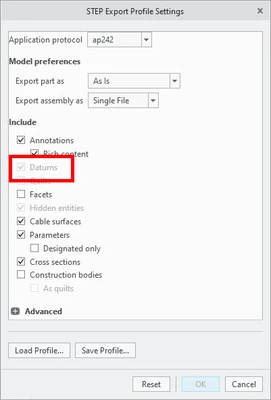
Fix Step File data, when exporting with "Datums" (layers, exploded lines)
1. Describe your environment: What is your industry? What is your role in your organization? Describe your stakeholders.
We design and manufacture high-end electronics. I am the CAD Manager / PTC SME. Stakeholders for this idea include our Creo user community.
2. What version of Creo Parametric are you currently running?
8.0.6.0
3. Describe the problem you are trying to solve. Please include detailed documentation such as screenshots, images or video.
Reference:
Case - C15496755
SPR - 10313631
Article - CS328821
When we export a step file, and check to include "Datums" in includes:
1 - Exploded lines
2 - A new layer for every part that has the same layer. For instance, let's say there are 10 models using layer "3_ALL_AXES". On reimport of the step file, there would be 10 layers with names "3_ALL_AXES_1" through "3_ALL_AXES_10". This makes breaks the whole purpose of layer management. It is a mess. Please fix so we can continue to move forward in our digital transformation journey.
4. What is the use case for your organization?
We have the "Datums" checked so we can see export product artwork within the step file. Meaning, we either keep the option and loose layer functionality and show unintended elements, like exploded lined, or we uncheck that option and loose the ability to transfer artwork data (stored as curves).
5. What business value would your suggestion represent for your organization?
It allows us to move forward with MBD and MBE. Without having the ability for customers to see the step data appropriately, we can't leverage its full potential and move forward.